


Our San Antonio scenery adds 75+ handcrafted city buildings, enhanced textures, signage, and detailed night lighting for MSFS 2020 and MSFS 2024. The San Antonio, Texas city pack is particularly well suited to a day-to-night sightseeing session. Use a broad skyline view to learn the building shapes, then return after dark to explore the illuminated facades and rooflines.
Why San Antonio is a strong night-scenery choice
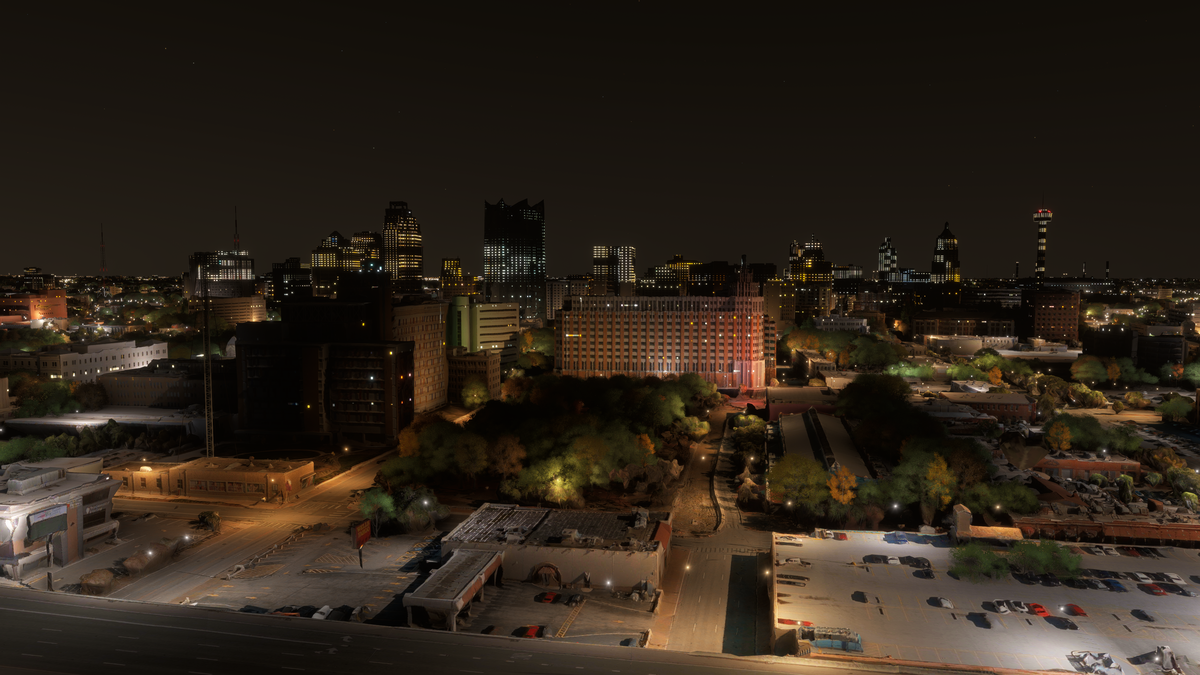
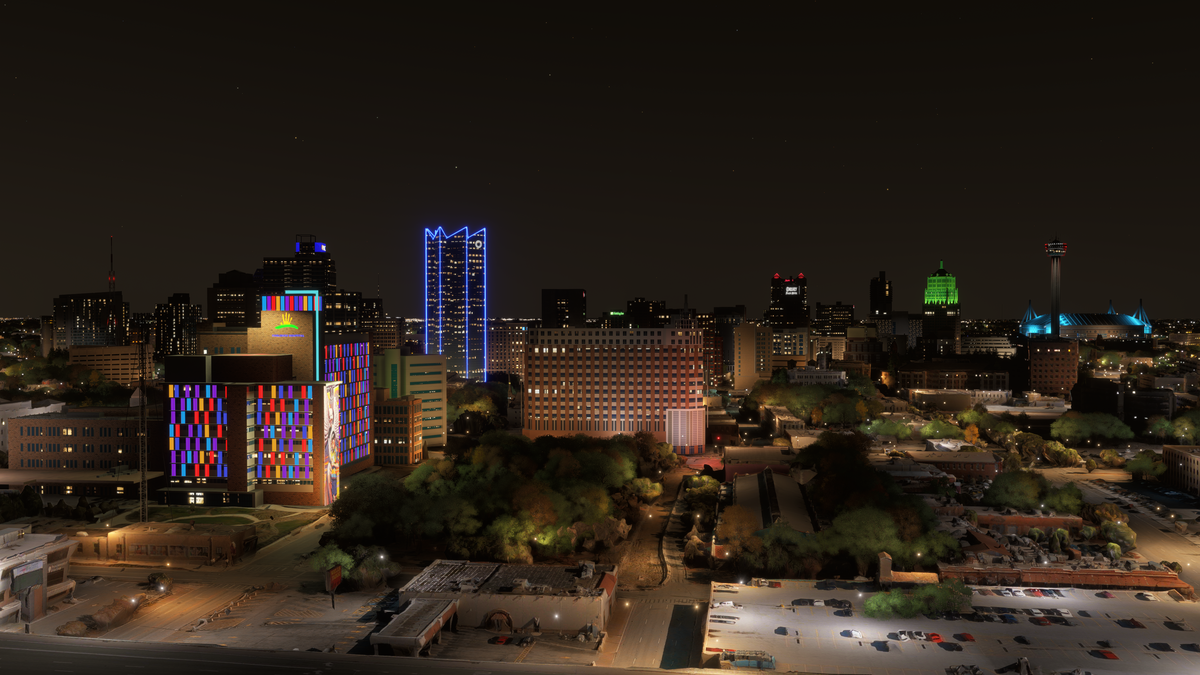
The individual lighting treatments are a major part of San Antonio’s visual appeal. Colored facade panels, blue tower outlines, and illuminated roof details create distinct subjects across downtown instead of a uniform field of windows. The before-and-after view lets you see those changes directly. Start in daylight for the building shapes, then revisit the same viewpoint after dark for the lighting.
What to look for in the San Antonio skyline
The city pack concentrates on handcrafted buildings and their visual character. For a first pass, look at the variation in height and shape across downtown: stepped rooflines, glass towers, broad hotel blocks, and smaller buildings around them. You can explore the same skyline at two scales, keeping the city in context from a distance and choosing individual facades for closer views.
Enhanced textures and PBR materials are part of the package. In a close daylight view, look at the division between glass surfaces and solid building faces, the window patterns, and the modeled edges of the towers. A slightly offset camera angle often reveals more of a building’s shape than a straight-on frame.

Why leave time for a night pass?
Lighting changes which parts of the city attract your attention. In the screenshot below, a multicolored facade, blue outline lighting on a tall building, and a green-lit crown stand out across the skyline. These give a night session a different set of subjects from the daylight architecture.
For a clear composition, keep some dark sky above the roofs and enough foreground to show where the buildings sit. Then choose a second, tighter frame that concentrates on a lit facade or a sign. This avoids turning every screenshot into the same wide panorama.
San Antonio night lighting before and after
Compare the two night views below. In the add-on scene, multicolored panels cover the foreground facade, blue lighting outlines the taller building behind it, and a green-lit crown stands out farther across downtown. These are specific lighting differences you can use as sightseeing subjects.
A suggested day-to-night simulator session
- Begin with a daylight overview. Choose a view where the downtown buildings can be seen together. Give yourself time to identify a few rooflines you will recognize after dark.
- Select two contrasting buildings. A glass tower and a broad hotel-style facade make useful separate subjects. Use the simulator camera to examine windows, building edges, and signage.
- Return for late light. Keep the same general view but change the time of day. Look at how light and shadow separate the faces of the buildings, particularly where towers stand close together.
- Move into the night skyline. Frame the colorful facades and roofline lighting. A wide shot shows how the different colors are distributed across downtown.
- Finish with a sign or facade detail. Use a tighter view to bring one illuminated subject forward. Keep another building in the background to preserve the sense of place.
This sequence works as a sightseeing flight with camera stops or as a dedicated screenshot session. If you want to compare your own day and night captures, keep the camera position, field of view, and weather similar, changing one thing at a time.
Watch the San Antonio official trailer by AviationLads
Official promotional trailer by AviationLads. Watch on YouTube.
Compatibility and scenery scope
San Antonio supports both MSFS 2020 and MSFS 2024. Its core features are 75+ handcrafted city buildings, enhanced textures, night lighting, signage, and PBR materials. Plan your sightseeing around the city skyline and individual building detail.
If your installation already includes another San Antonio city add-on, check for overlapping scenery before combining packages. Keep a note of what you install so you can identify the scenery involved if a building appears duplicated.
San Antonio scenery FAQ
Is the San Antonio pack compatible with MSFS 2024?
Yes. The pack supports MSFS 2024 and MSFS 2020. The same city-focused sightseeing ideas apply to both supported simulator versions.
How many buildings are included?
There are 75+ handcrafted city buildings. The pack also includes enhanced textures and signage, making close building views as useful as broad skyline passes.
What makes the night views worth exploring?
The pack includes detailed night lighting and signage. The night screenshot shows colored facade panels, a blue-lit tower outline, and colored roof accents that create distinct subjects across downtown.
Should I start in daylight or after dark?
Start in daylight if you want to understand the building shapes and city layout. Then revisit a familiar viewpoint at night so that the illuminated features are easier to place.
Where can I find installation help?
Our installation guide covers the direct-download process and Community-folder setup. If your purchase email or download is missing, contact support using the email address associated with your order.
What simmers say
Selected customer and community reviews:
“San Antonio is one of their best.”
“Very accurate rendering of the downtown buildings.”
“Home town done right!”
Community discussions
- San Antonio launch discussion on the MSFS forums
- San Antonio before-and-after post on Reddit (developer post)
Get the San Antonio city pack
Buying direct? Download the scenery from the post-checkout download screen or your purchase email, unzip it, and open the extracted folder. Inside PackagesContent, move the scenery folder to your MSFS Community folder. Our installation guide walks through the process. If your download is missing, email support from the address used for your purchase.
Explore the gallery and current purchase options on the San Antonio, Texas product page.
For setup or compatibility help, email dan@dfflyerdirect.com or visit the Dfflyer Direct Discord. Browse more destinations in our scenery guides.