


Our Salt Lake City scenery brings 75+ handcrafted buildings, the Utah State Capitol, and the Salt Lake City Temple to Microsoft Flight Simulator and MSFS 2024. The Salt Lake City, Utah city pack is a good destination for a landmark-focused simulator session: start with the downtown skyline, then take time over the two detailed architectural centerpieces.
Why the Salt Lake City landmarks reward close inspection
The Capitol and Temple give this pack an architectural focus that complements the downtown skyline. Dome ribs, columns, decorative stonework, and repeated window details become subjects in their own right when you move the camera closer. If you enjoy alternating between a broad city view and a carefully framed landmark, Salt Lake City offers a compact and varied scenery session.
Begin with the city, then move closer
A wide view explains how the pack fits together. The downtown buildings form the main skyline, while the Capitol and Temple give you two recognizable subjects for closer inspection. The city pack combines these handcrafted structures with enhanced textures, night lighting, and signage.
For your first look, frame downtown with the surrounding landscape still visible. The screenshot below gives an overview of the building cluster and its street pattern. Keeping that broader context in your first composition makes a later close-up of the Capitol dome or Temple roofline more meaningful.

Two landmarks worth a separate camera stop
The Utah State Capitol
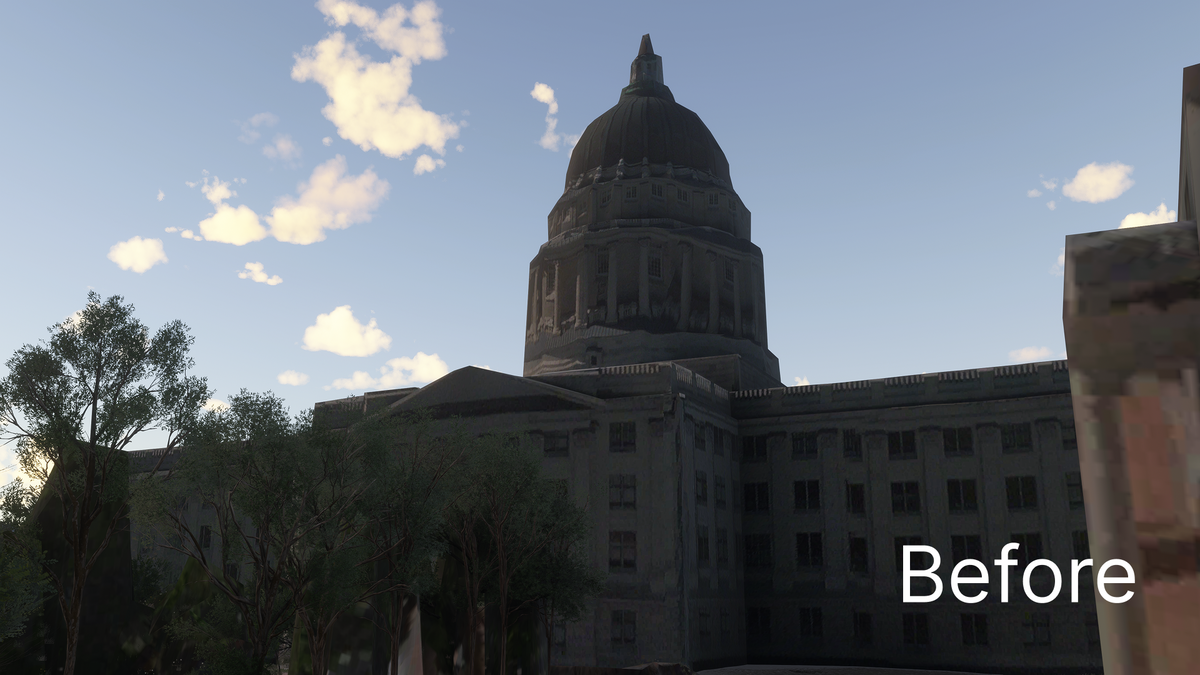
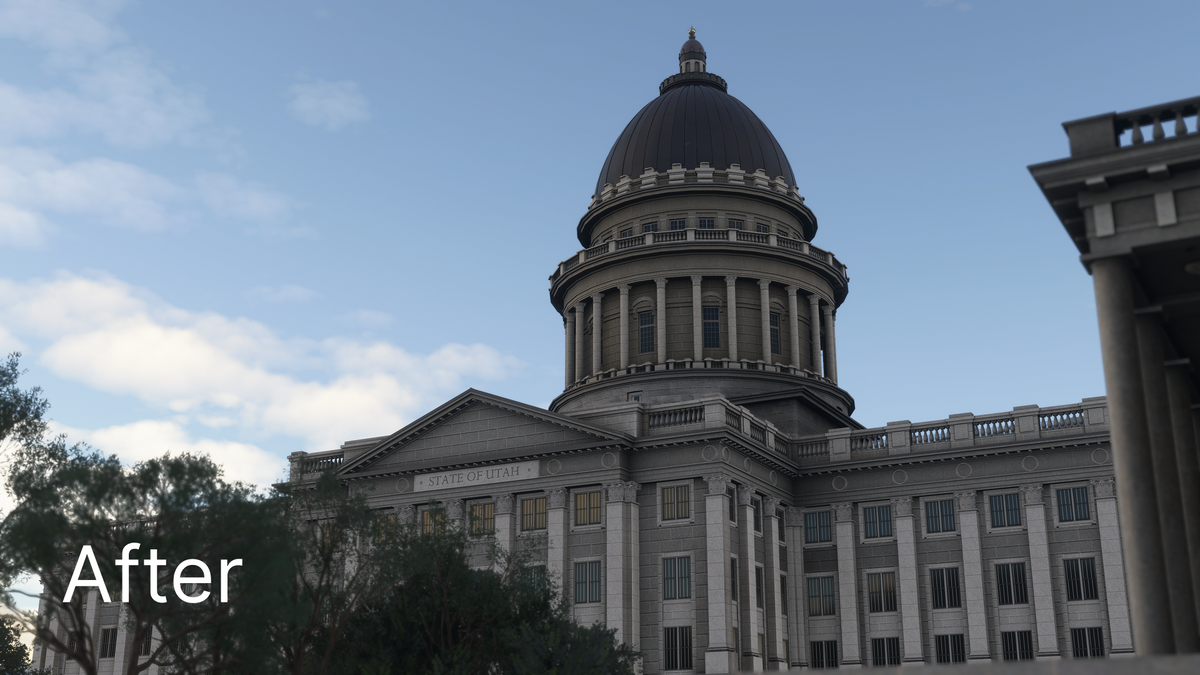
The Capitol’s dome, columns, and long facade give it a different silhouette from the downtown high-rises. In the close view below, you can inspect the dome’s ribbing, the band of columns beneath it, the pediment, and the repeated window pattern. These visible architectural elements are a useful reason to set up a deliberate camera stop instead of treating the building as a distant waypoint.
Try two compositions: one that includes the full facade and another that concentrates on the dome. Leave a little sky around the roofline so its shape remains clear. A side-lit daytime view can make the modeled recesses easier to read.
Our Capitol comparison shows the difference at architectural scale. Look at the dome outline, the separation of the columns beneath it, and the repeated window and facade details. The custom model gives those elements a more clearly defined shape in the add-on view.
The Salt Lake City Temple
The Temple is a contrasting subject. Its pointed towers, smaller pinnacles, decorative roofline, and statue produce a much more intricate silhouette. The screenshot below looks upward, showing why a camera at a different height can reveal details that are easily lost in a broad aerial view.
For a useful sequence, photograph the whole building first, then frame a section of the towers against the sky. The pack’s detailed landmark modeling is especially relevant at this scale. The Temple and Capitol are both highlighted features of the scenery, alongside the larger set of handcrafted city buildings.

A suggested Salt Lake City sightseeing session
- Establish the downtown skyline. Begin with a broad daytime circuit or camera view. Pick out the building cluster and the two major landmarks before zooming in.
- Pause at the Capitol. Use a facade view for context and a second view for the dome. A simulator camera is useful when you want time to study the architecture.
- Move to the Temple. Compare a full-building composition with an upward view of the towers. Change the framing, rather than simply moving closer to the same shot.
- Finish at dusk or after dark. Return to the downtown overview to explore the city pack’s night lighting and signage. Keep the landmarks in the wider composition when possible.
You can use the same sequence for a short sightseeing flight or a slower screenshot session. The camera stops are particularly helpful if you prefer architectural detail to a continuous flyover.
Watch the Salt Lake City official trailer by AviationLads
Official promotional trailer by AviationLads. Watch on YouTube.
Salt Lake City scenery FAQ
What are the main included landmarks?
The Utah State Capitol and Salt Lake City Temple are the two specifically highlighted landmarks. They sit within a package of 75+ handcrafted city buildings and an enhanced downtown skyline.
Is this scenery for MSFS 2024?
Yes. Salt Lake City is offered for Microsoft Flight Simulator and MSFS 2024. Use the product page and supplied download instructions when setting up your copy.
Is it worth returning at night?
Yes, night lighting and signage are part of the city pack. Revisit a daylight composition to see the illuminated buildings in the same overall setting.
What should I include in a city sightseeing session?
Include a downtown overview and separate stops at the Utah State Capitol and Temple. Use wider city views to connect the two landmark close-ups, then revisit your favorite composition after dark.
Where should I begin if I want screenshots?
Start with a wide downtown frame, then give the Capitol and Temple their own close views. This produces an overview, a domed architectural subject, and an intricate tower composition within one session.
What simmers say
Selected customer and community reviews:
“Night lighting is a major improvement as well.”
“In darkness, the city looks stunning in FS2024.”
This launch-era review also noted rougher detailing on some outlying buildings.
“This scenery is AMAZING!!!”
Community discussions
- Salt Lake City review and developer response on the MSFS forums
- Salt Lake City landmark suggestions on Reddit (developer post)
Get the scenery and set it up
Buying direct? Download the scenery from the post-checkout download screen or your purchase email, unzip it, and open the extracted folder. Inside PackagesContent, move the scenery folder to your MSFS Community folder. Our installation guide walks through the process. If your download is missing, email support from the address used for your purchase.
View the complete gallery and current purchase options on the Salt Lake City, Utah product page.
For setup or compatibility help, email dan@dfflyerdirect.com or visit the Dfflyer Direct Discord. Browse more destinations in our scenery guides.