


The dfflyerdirect Rio de Janeiro scenery pack adds 350+ handcrafted city buildings, marinas, boats, beach lighting and enhanced night detail to MSFS 2020 and MSFS 2024. It is also compatible with World Update XIX: Brazil and Paulo Ricardo's SBRJ scenery.
Rio's skyline sits between water and steep hills, giving a city sightseeing session several distinct subjects. This pack focuses on the built scene and waterfront details, from groups of downtown towers to the lighting along the beach. Here is what to look for and how to approach a first simulator visit.
Why the Rio waterfront is worth a closer look
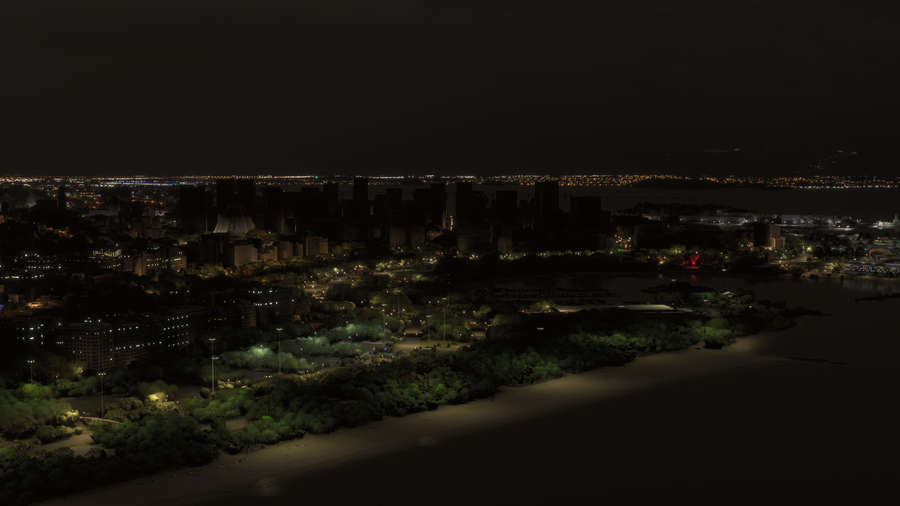
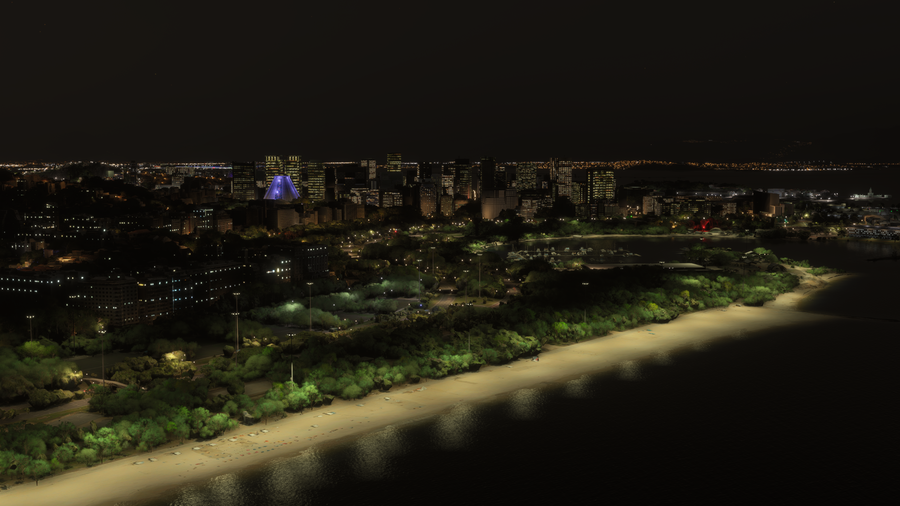
Rio’s water, hills, and skyline make an appealing setting for city exploration. The pack’s modeled buildings, marinas, boats, and lighting add subjects within that larger landscape. The night comparison is especially useful: you can see the illuminated shoreline and distinct building accents across a broad view. A slower waterfront pass gives those smaller scenery details room to be appreciated.
What is included in the Rio scenery?
- 350+ handcrafted city buildings.
- Custom marinas and boats.
- Beach lighting.
- Enhanced night lighting and signage.
- PBR textures.
A wide daytime view is useful for seeing the buildings in their surroundings. Our gallery image below places the downtown skyline behind the waterfront, with the hills beyond. The variety of building heights is easier to follow from this open angle than from directly above the towers.

Buildings, marinas and the waterfront
The city buildings provide the main skyline, while marinas and boats add detail at the water's edge. For a closer look, use the simulator's camera to move between a broad skyline composition and a lower waterfront view. Each emphasizes a different part of the scenery.
In a daytime session, try keeping the shoreline in the foreground to show how the buildings meet the water. When you move closer to individual structures, the facade patterns and textures become more useful subjects than the overall silhouette. The full product gallery includes both wide and closer perspectives.
Rio before and after: beach and skyline lighting
The matched views below come from the comparison on our product page. Look at the illuminated strip of beach in the foreground and the windows across the downtown skyline. The add-on view shows lighting as part of the whole waterfront scene, rather than only a few bright buildings.
Suggested Rio simulator sightseeing session
- Start with the daytime skyline. Use an open waterfront viewpoint to pick out the different tower shapes against the hills.
- Explore the water's edge. Take time to inspect marina and boat details with the camera, then widen the view to put them back into the city scene.
- Revisit the shoreline at night. Compare the beach lighting, building windows and signage from a familiar angle.
For screenshots, a lower viewpoint can give the water more space in the frame, while a higher oblique view shows more of the city blocks. Try both before deciding which part of Rio you want to make the main subject.
Watch the Rio de Janeiro official trailer by AviationLads
Official promotional trailer by AviationLads. Watch on YouTube.
Compatibility and installation
Rio supports MSFS 2020 and MSFS 2024, along with World Update XIX: Brazil and Paulo Ricardo's SBRJ add-on. That named compatibility is useful if your simulator flights already use the Santos Dumont airport scenery and you want to add the surrounding city.
For direct-store downloads, our installation guide covers the process: unzip the download, open PackagesContent, and place the scenery folder inside it into your simulator's Community folder. Downloads are available after checkout and through the purchase email.
Rio de Janeiro scenery FAQ
Does the pack work with World Update XIX: Brazil?
Yes. Compatibility with World Update XIX: Brazil is supported.
Can I use it with Paulo Ricardo's SBRJ?
Yes. The Rio city pack supports that airport add-on. Paulo Ricardo's SBRJ is a separate product.
Are boats and beach lights included?
Yes. Custom marinas, boats and beach lighting are included alongside the city buildings and enhanced night lighting.
Where can I check another Rio add-on combination?
Email dan@dfflyerdirect.com with the product name and your simulator version, or ask in our Discord.
What simmers say
Selected customer and community reviews:
“great enhancement over the photogrammetry version”
A verified buyer compares the scenery with default photogrammetry.
“once again very beautiful”
Comparing SBRJ airport add-ons, the poster describes the city scenery this way. Both airports appeared compatible in their test, but they preferred Gaya’s airport-to-city transition because its extra landside buildings reduced the photogrammetry gap.
Community discussions
- Rio airport compatibility and discussion on the MSFS Forums: User screenshots, airport-pairing comparisons, and community feedback.
See the complete gallery and current details on the Rio de Janeiro product page.