


Dfflyer Direct’s Portland scenery adds 75+ handcrafted buildings, eight named Willamette River bridges, a custom marina, and riverfront cleanup to Microsoft Flight Simulator 2020 and 2024. The Portland, Oregon city pack also includes a bridge-free file for people using RKBridgers. This guide follows the river to help you decide what to explore and which package option fits your setup.
Why choose Portland for a bridge-focused tour?
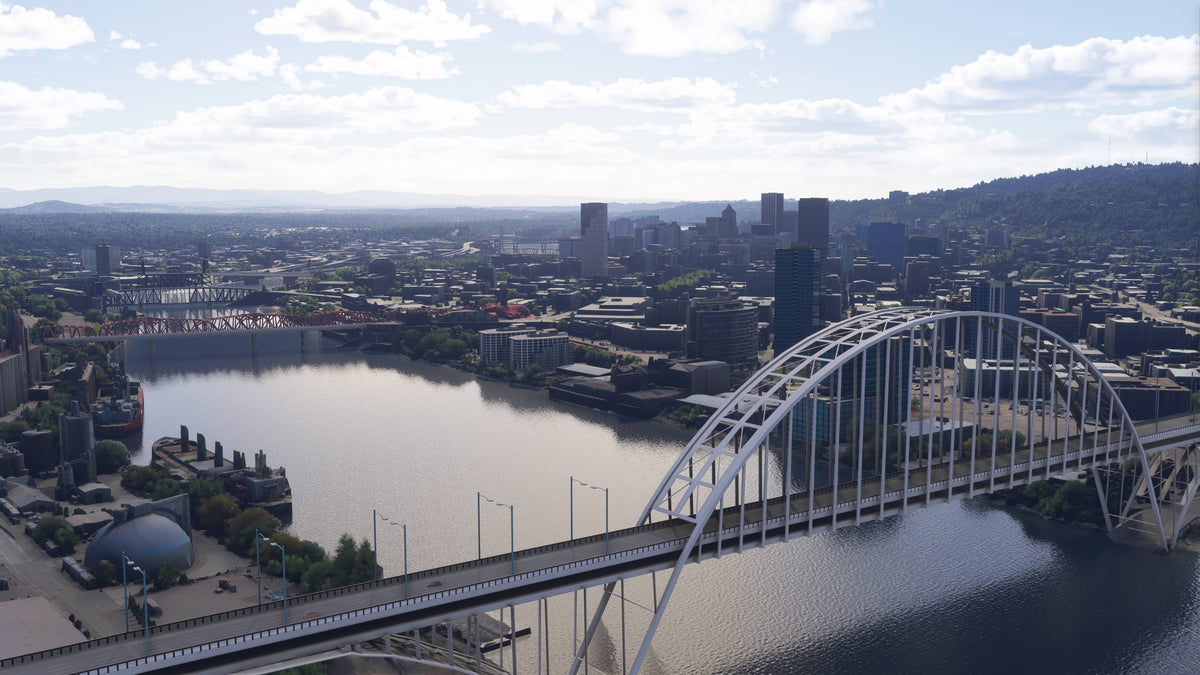
The strongest draw is the river corridor. Individually modeled crossings give each part of the Willamette a different visual character, while the downtown buildings and marina fill out the surrounding scene. The Fremont comparison shows why this matters: open structural elements and a defined road deck read clearly against the water. It is a good fit for pilots who enjoy bridges, riverfront detail, and city photography.
What does the Portland scenery cover?
The focus is downtown Portland and its riverfront. Buildings, bridge structures, boats, docks, water cleanup, and tree cleanup contribute different parts of the scene. A broad skyline view is useful for orientation, but a river-focused sightseeing session gives you more opportunities to notice how those pieces connect.
The bridge lineup includes Tilikum Crossing, Hawthorne, Morrison, Burnside, Steel, Broadway, Fremont, and Marquam. That is a practical checklist for your simulator tour. The pack also includes enhanced night lighting, signage, and PBR textures. The pack focuses on selected city buildings, bridges, and the riverfront. Use the named river corridor as your starting point.
Fremont Bridge before and after
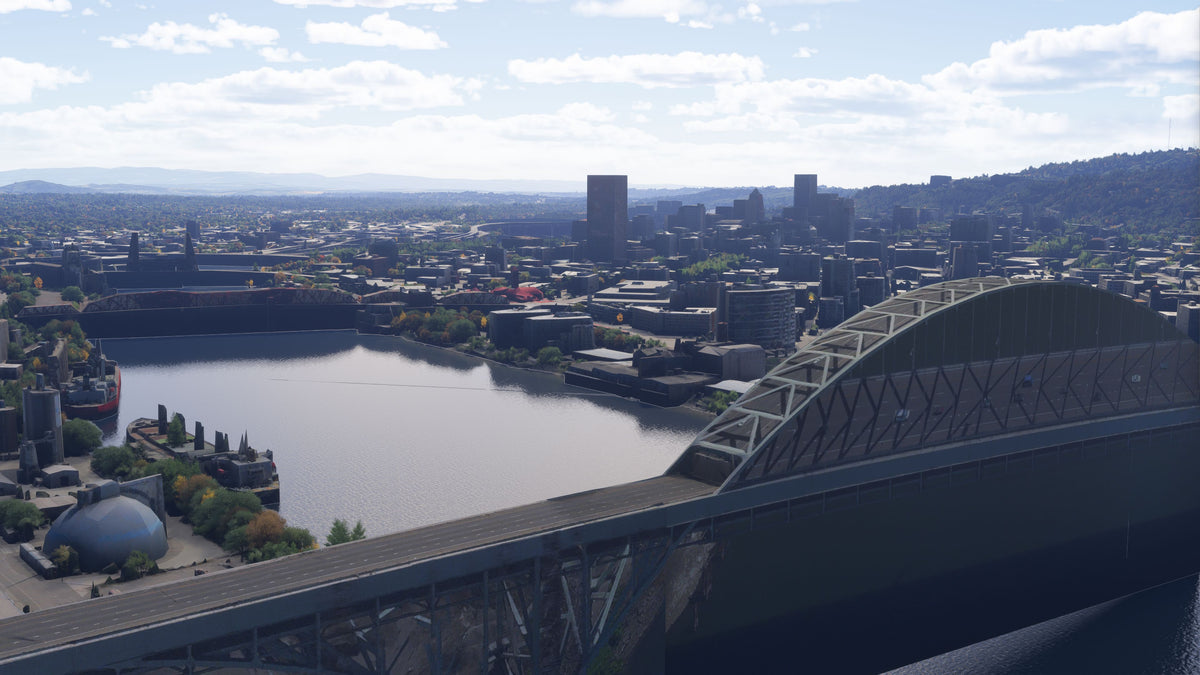
The Fremont comparison is a useful place to examine the bridge modeling. The default view has a broad, dark side profile. In the add-on view, the arch, vertical supports, and road deck are visibly separated, with open space between the structural elements.
Read the bridges and shoreline together
Portland’s bridges are useful visual reference points because their structures vary. The Fremont view above brings the riverbanks, downtown skyline, and bridge into one scene. Look at the shape of the bridge supports and the way each crossing meets the shore before moving closer to individual buildings.
The custom marina adds another scale of detail. Boats and docks reward a slower camera pass than the skyline does. Water and tree cleanup are also included along the riverfront. These finishing touches make the shoreline worth exploring as well as the structures above it.

A suggested Willamette River sightseeing session
Use these stops as a simulator sightseeing sequence, with a sightseeing aircraft, helicopter, or the simulator camera. Start in daylight to get your bearings, then revisit a favorite viewpoint at night.
- Start with a wide river view. Find downtown and give yourself enough distance to see several crossings together. This makes the relationship between the bridge network and the building cluster easier to follow.
- Explore the southern crossings. Use Tilikum Crossing and Marquam as two distinct subjects. Pause or use the camera when you want to study structural detail without having to manage the aircraft at the same time.
- Continue through the downtown bridge group. Pick out Hawthorne, Morrison, and Burnside, then look toward Steel and Broadway. Focus on one bridge per pass rather than trying to frame the entire list at once.
- Finish with Fremont and the waterfront. A wider view of the arch and river is a useful closing composition. Add a separate marina camera stop for the smaller boat and dock details.
- Repeat a favorite view after dark. Keep the same general camera direction so that the building and bridge lighting becomes the main change you notice.

Portland v1.1: more bridges and landmarks
The v1.1 changelog on Flightsim.to expands the sightseeing options beyond the original downtown and Willamette coverage. It lists Columbia River bridges near KPDX, Union Station, the Oregon Convention Center, Providence Park, and more river cleanup. The listing was last updated August 2, 2026. Check the version supplied by your purchase channel when comparing it with launch reviews.
Bridge options, compatibility, and setup
The pack supports MSFS 2020 and MSFS 2024. It also includes a file without bridges for users of RKBridgers. That option lets you retain the other Portland scenery features while choosing the bridge source appropriate to your setup. Follow the supplied package instructions when choosing files; the existence of an alternate file is not a reason to install both variants together.
When choosing your files, consider any other Portland add-ons you use. If you already have another city or bridge add-on, compare its coverage before combining them.
Portland scenery FAQ
Does the pack include Portland’s bridges?
Yes. The product names Tilikum Crossing, Hawthorne, Morrison, Burnside, Steel, Broadway, Fremont, and Marquam. It also provides a bridge-free option for an RKBridgers setup.
Is the marina part of the scenery?
Yes. The pack includes a custom marina with detailed boats and docks. The screenshot above gives a useful view of that smaller waterfront detail alongside the city buildings.
Does it work with both MSFS 2020 and MSFS 2024?
Yes, both versions are explicitly supported on the product page. Check the purchase and installation instructions for the package you use, particularly when selecting the bridge variant.
Does the package replace all of Portland?
The pack includes 75+ handcrafted city buildings, the listed bridges, a marina, and riverfront cleanup. It focuses on selected city landmarks and the river corridor rather than replacing every building in Portland.
What should I look at during a night session?
Return to a river viewpoint where bridges and downtown share the frame. Enhanced night lighting and signage are included, and the night view above illustrates the bridge lighting against the darker water.
Buying direct? Download the scenery from the post-checkout download screen or your purchase email, unzip it, and open the extracted folder. Inside PackagesContent, move the scenery folder to your MSFS Community folder. Our installation guide walks through the process. If your download is missing, email support from the address used for your purchase.
What simmers say
Selected customer and community reviews:
“Portland never looked so good.”
“the bridges and night lighting especially are better than default”
“I live here & was so impressed with the detail.”
Community discussions
- Portland before-and-after discussion on Reddit (developer post)
Explore the Portland city pack
See the full gallery and current purchase options on the Portland, Oregon product page. Start with the river corridor, choose the appropriate bridge file, and build a sightseeing session around the details you most want to inspect.
For setup or compatibility help, email dan@dfflyerdirect.com or visit the Dfflyer Direct Discord. Browse more destinations in our scenery guides.