


The Pittsburgh scenery pack for MSFS 2020 and MSFS 2024 adds more than 120 handcrafted city buildings, 21 bridges, three detailed sports venues, an animated Duquesne Incline, and nine enhanced marinas. Its coverage follows the city and its rivers, making bridge spotting, stadium views, and hillside landmarks natural subjects for a simulator tour.

Why Pittsburgh works so well as a scenery destination
Pittsburgh’s character comes from how its bridges, stadiums, hills, and rivers fit together. Our pack gives each of those elements a role, with close-up stadium detail, custom river crossings, marina work, and the moving Duquesne Incline. That variety makes the scenery rewarding both for a broad sightseeing circuit and for a slower drone-camera session around one landmark.
What does the Pittsburgh city and bridges pack cover?
The pack's 21 bridges extend along the Ohio, Allegheny, and Monongahela Rivers. They give a sightseeing flight more to follow than the downtown buildings alone: you can use the waterways as a visual thread, watching the skyline change as you pass different crossings.
The city coverage includes 120+ handcrafted buildings and three sports venues: PNC Park, Acrisure Stadium, and PPG Paints Arena. Nine marinas receive custom boats along with photogrammetry and water cleanup. Ground texture improvements, enhanced night lighting, and signage contribute at closer viewing distances.
- City: more than 120 handcrafted buildings
- Rivers: 21 bridges across the three named waterways
- Sports: PNC Park, Acrisure Stadium, and PPG Paints Arena
- Movement: an animated Duquesne Incline
- Waterfront: nine marinas with custom boats and surrounding cleanup
- Materials: PBR textures and multiple levels of detail
PNC Park at a closer viewing distance
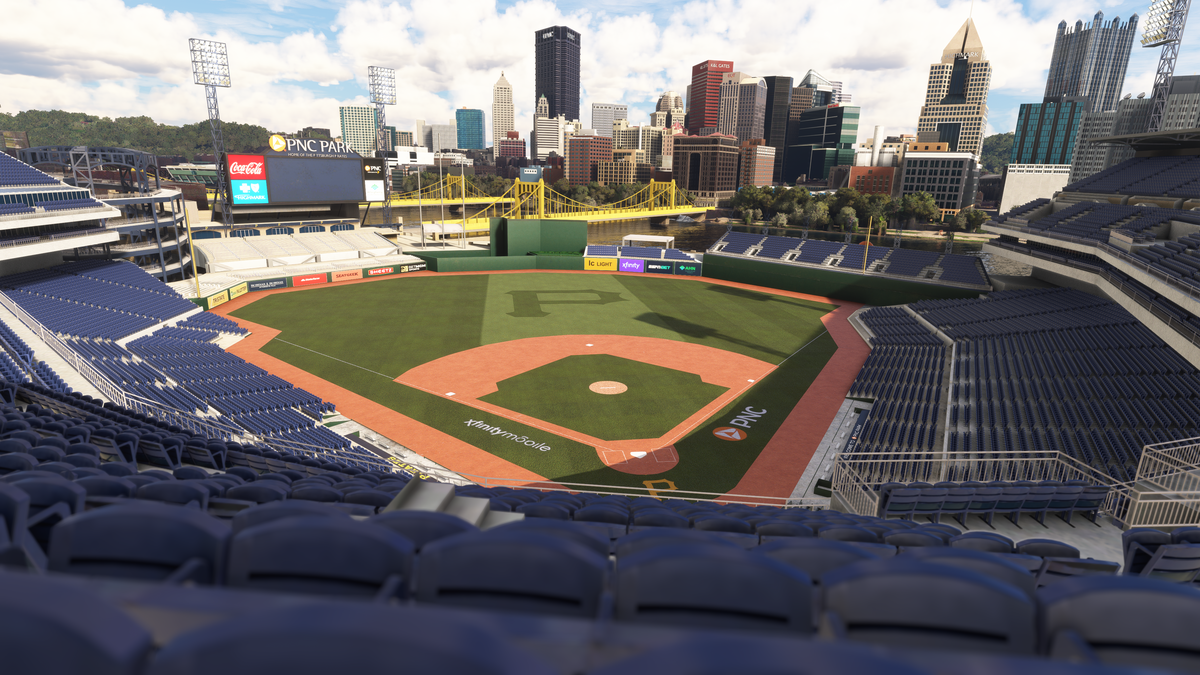
The stadium screenshot shows a view from within PNC Park, with seating rows, railings, field markings, advertising, and a scoreboard visible around the playing field. Beyond the outfield, a yellow bridge and the downtown skyline remain part of the same view. That combination makes the stadium a good place to pause with the simulator's drone camera.
PNC Park before and after
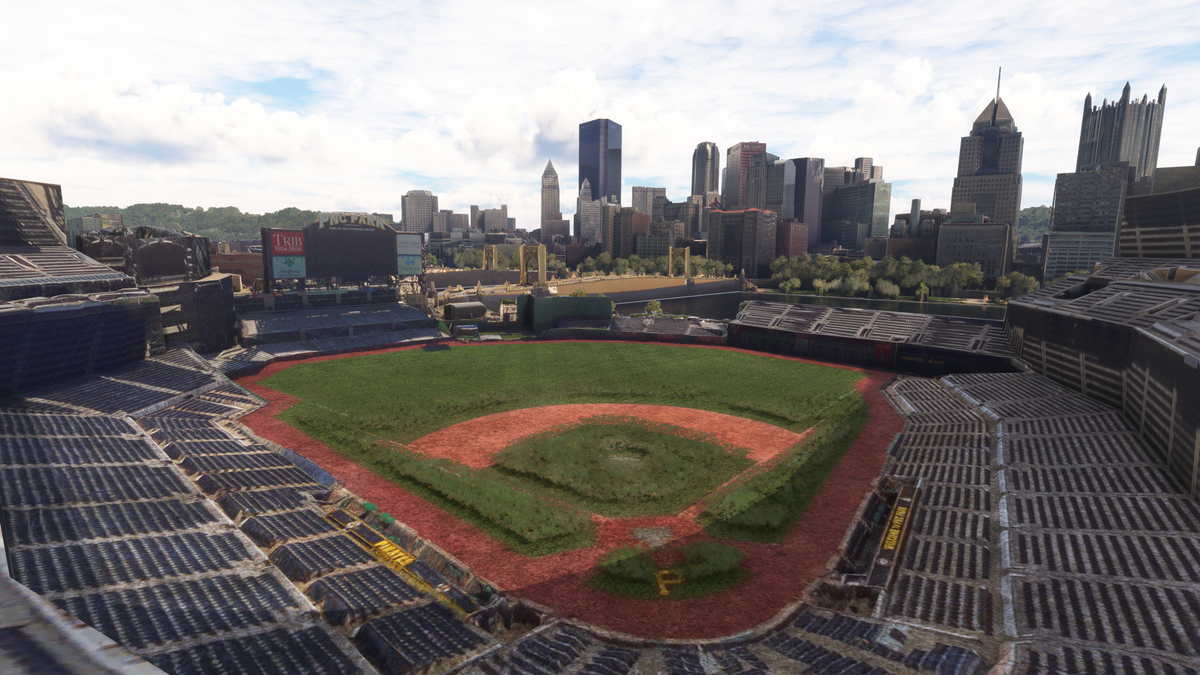
Our PNC Park comparison is a good example of the difference at stadium scale. Look at the individual seats and railings in the foreground, the clean field markings, and the scoreboard and advertising beyond the outfield. The custom stadium keeps the yellow river crossing and downtown skyline as part of the familiar ballpark view. These images are the before-and-after comparison from our product listing.
A suggested river-and-hillside tour
Begin with a broad daylight view of downtown and the river junction, then follow one waterway at a time to inspect the bridge coverage. Make PNC Park and Acrisure Stadium two of your stops before turning your attention to the hillside. This approach gives the bridges, stadiums, and buildings a clear relationship to one another.
At the Duquesne Incline, use a stationary drone-camera viewpoint to appreciate the animated cars and the slope they travel. The screenshot below shows a red car on the track above the lower station, with the wooded hillside surrounding it. Finish by returning to the city at dusk to inspect the lighting and signage.

Watch the Pittsburgh official trailer by AviationLads
Official promotional trailer by AviationLads. Watch on YouTube.
Frequently asked questions
Does the Pittsburgh pack work in MSFS 2024?
Yes. The product supports both MSFS 2024 and MSFS 2020. Its listing describes the same city, bridge, and waterfront feature set for the pack.
Which stadiums are included?
PNC Park, Acrisure Stadium, and PPG Paints Arena are included. Acrisure Stadium is identified in the listing as formerly Heinz Field.
Is the Duquesne Incline animated?
Yes. An animated Duquesne Incline is an explicitly listed feature. It is worth viewing from a steady camera position so that you can follow its movement on the hillside.
How do I install the scenery from the store?
Extract your download, open PackagesContent, and copy the scenery folder into your MSFS Community folder. The illustrated installation guide covers the process and provides help if you cannot find the folder.
What simmers say
Selected customer and community reviews:
“made Pittsburgh come alive”
Gordon praised how the added detail changes the city’s appearance.
“You did my city proud”
Andrew’s review emphasizes his connection to Pittsburgh.
“Well done! Amazing detail!”
dschumm particularly enjoyed sightseeing downtown and the working Duquesne Incline.
Community discussions
- MSFS Forums: the full Pittsburgh hands-on review
- Reddit: Pittsburgh release discussion (developer post)
Explore Pittsburgh’s rivers and landmarks
View Pittsburgh, Pennsylvania and its full screenshot gallery. For installation help, use the installation guide, email dan@dfflyerdirect.com, or join our Discord.