


The dfflyerdirect Orlando, Florida scenery pack adds 80+ handcrafted buildings, animated landmarks and enhanced night lighting to MSFS 2020 and MSFS 2024. The main focus is the downtown skyline, with an animated Lake Eola fountain and selected attractions including the Orlando Eye, StarFlyer and Sky Tower.
Orlando has changed considerably since the satellite and photogrammetry data used by the default scenery. This pack concentrates on the city's buildings and lighting, while adding movement to a handful of recognizable landmarks.
Why the Orlando pack rewards a second look
Orlando’s appeal is in the movement as well as the buildings. The wind-reactive Lake Eola fountain gives a downtown camera view a changing focal point, while the animated Orlando Eye and StarFlyer add a different sightseeing stop. Detailed city buildings and lighting connect those attractions with the wider scene. It is particularly suited to relaxed city exploration and day-to-night screenshots.
What does the Orlando pack cover?
- 80+ handcrafted city buildings.
- An animated Lake Eola fountain that responds to the wind.
- Animated Orlando Eye, StarFlyer and Sky Tower.
- Enhanced night lighting and signage.
- PBR textures.
The downtown gallery gives you a useful starting point: compare the shapes and spacing of the buildings from above, then move toward Lake Eola for a closer look at the fountain. These are complementary views of the same scenery, with the larger skyline giving context to smaller animated details.

Lake Eola: a downtown landmark with movement
The fountain in Lake Eola is animated, including the way its water jet blows with the wind. That makes it worth watching for a moment rather than treating it as a static object on a quick pass.
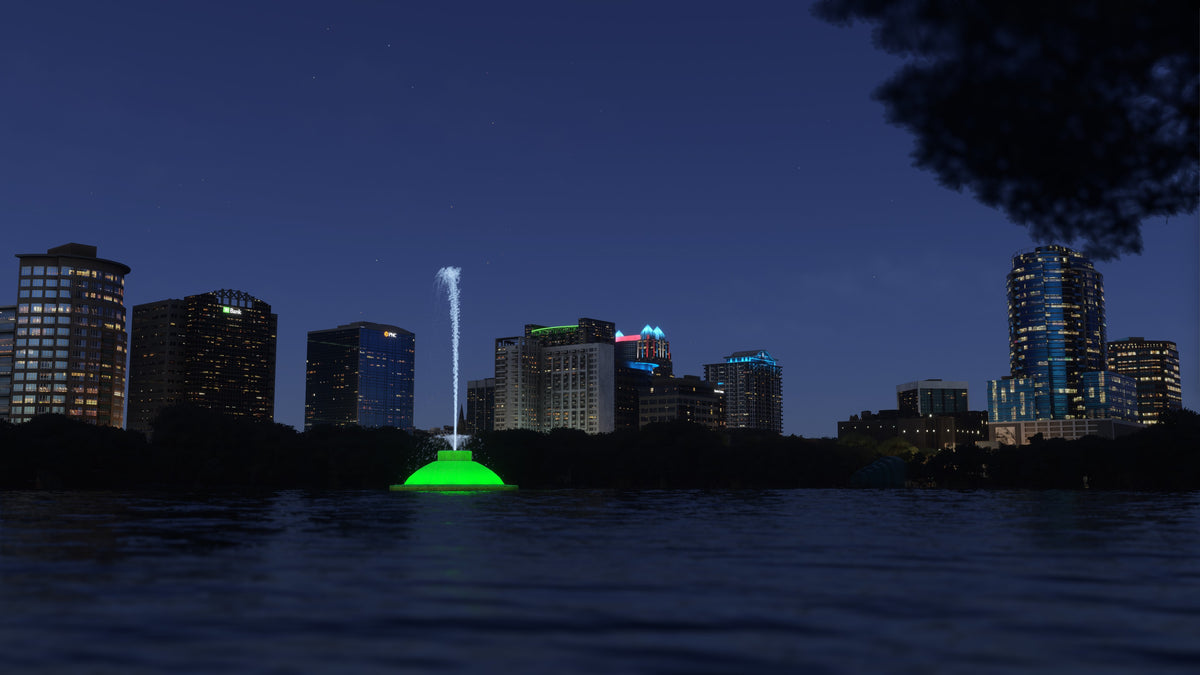
Our animation below shows the fountain in daylight. For a second view, try the same area at night: the gallery image shows the illuminated fountain against the surrounding towers. Together, these views highlight the pack's two main types of detail, animation and lighting.

Lake Eola before and after at night
Lake Eola makes the difference easy to see. The default view has a largely dark lake foreground; our scenery adds the bright green fountain and its tall water jet, with more distinct lighting and modeled tower shapes behind it. The animated fountain turns this recognizable Orlando setting into a worthwhile place to pause the camera. These images are the before-and-after comparison from our product listing.

Animated attractions and the theme-park boundary
The Orlando Eye, StarFlyer and Sky Tower are included as animated attractions. The GIF below shows the illuminated observation wheel and tall swing ride at night.
This is not a complete theme-park expansion. Beyond the specifically listed attractions, the pack does not add or enhance new theme parks. Its main purpose is downtown skyline and night-lighting enhancement. That distinction is useful if you are choosing between a city-focused add-on and a product intended to rebuild a particular park.

Suggested Orlando simulator sightseeing
Begin with a daylight overview of downtown, then use the camera controls to settle near Lake Eola and watch the fountain. Next, explore the listed attractions as a separate stop rather than expecting every theme park to be rebuilt. Finish with a night view to see the skyline lighting and illuminated rides.
For screenshots, try keeping the same camera position as you switch between daylight and evening. The comparison makes the building silhouettes, signs and lighted accents easier to appreciate.
Watch the Orlando official trailer by AviationLads
Official promotional trailer by AviationLads. Watch on YouTube.
Compatibility and installation
The current Orlando pack supports MSFS 2020 and MSFS 2024. Direct-store installation follows our download and installation guide: unzip the download, open PackagesContent, and place the scenery folder inside it into your Community folder.
Orlando scenery FAQ
Does it rebuild Orlando's theme parks?
No. The focus is downtown and night lighting, with only the attractions specifically named above included as animations.
Does the Lake Eola fountain react to wind?
Yes. Its animated water jet responds to wind in the simulator.
Which simulator versions does this Orlando product support?
It supports Microsoft Flight Simulator 2020 and Microsoft Flight Simulator 2024.
Where can I check another Orlando scenery combination?
Contact dan@dfflyerdirect.com with the other add-on's name and your simulator version, or ask in our Discord.
What simmers say
Selected customer and community reviews:
“made it look more realistic”
Comparing downtown Orlando with the default photogrammetry, this verified buyer describes the visual improvement.
“an amazing addition”
This verified buyer is discussing the current Orlando pack.
“Gives a decent representation of downtown Orlando and Lake Eola.”
A verified product user highlights downtown Orlando and Lake Eola.
Community discussions
- Orlando release topic on the MSFS Forums: The community’s Orlando launch post.
See more screenshots and the current pack details on the Orlando, Florida product page.