


The dfflyerdirect New Orleans, Louisiana scenery pack adds 100+ handcrafted buildings, an enhanced Mississippi River waterfront, night lighting and manual tree and water cleanup to MSFS 2020 and MSFS 2024. It is city scenery for exploring the skyline and its riverside setting.
The river is a useful starting point for a New Orleans sightseeing session. From one side you can take in the skyline across open water; from above, you can see how the towers, stadium area and waterfront sit together. Changing the viewing angle gives each part of the pack a different emphasis.
Why revisit New Orleans after dark?
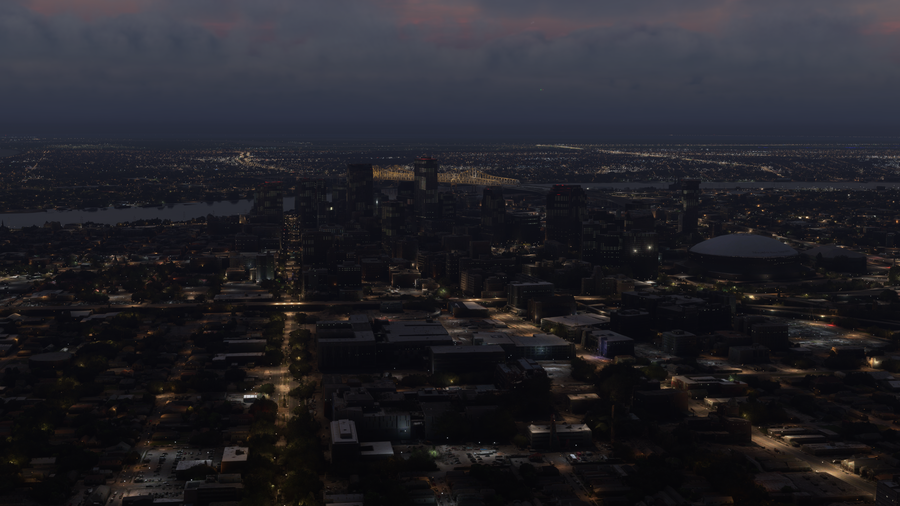
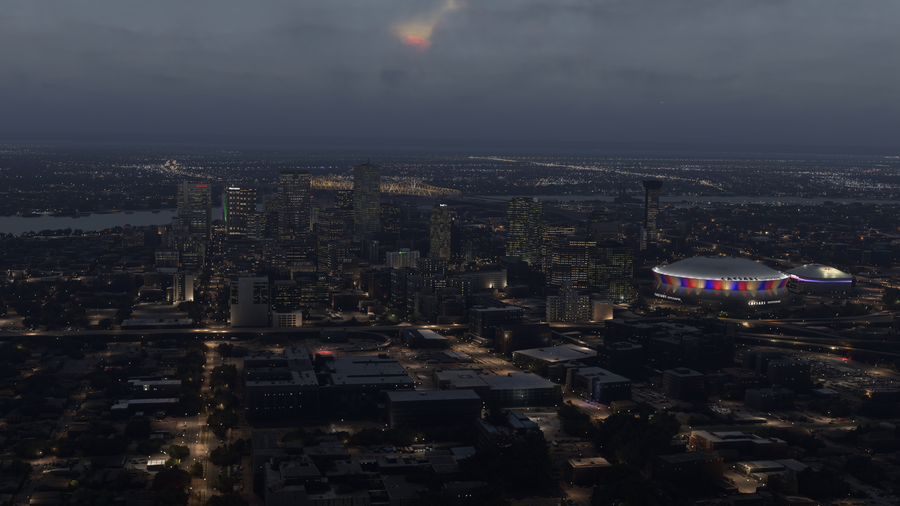
The night comparison shows one of the clearest reasons to explore this pack: downtown buildings become easier to distinguish, and the colorful stadium lighting gives the city a strong visual landmark. Pair that with a daylight riverfront pass to appreciate the building shapes and waterfront setting. For simulator photography, the two sessions offer very different compositions within the same city.
What does the New Orleans scenery include?
- 100+ handcrafted city buildings.
- Enhanced Mississippi River waterfront and skyline.
- Manual tree and water cleanup across the city.
- Enhanced night lighting and signage.
- PBR textures.
The work extends beyond individual buildings. Tree and water cleanup address the city around the models, while the waterfront provides a setting for wide views of downtown. Night lighting gives those same views a second character after sunset.

Where to look: the skyline and riverfront
For an overview, use a camera position with the Mississippi behind or beside the downtown towers. Our daytime gallery image shows the river's curve as well as the lower streets around the taller buildings. It is a useful composition when you want a sense of the whole city scene.
A lower viewpoint across the river is better for comparing building silhouettes. From there, the water provides an open foreground and the skyline becomes the main subject. For a closer inspection of textures or signage, use the simulator's camera controls rather than trying to take everything in during a single flyby.
New Orleans before and after at night
This pair comes from our product-page comparison. Look at the downtown windows and building lights, then the colored lighting around the domed stadium on the right. These are two different areas of the image worth inspecting, rather than concentrating on only the tallest tower.
Suggested simulator sightseeing session
- Get oriented in daylight. Start with a broad view that includes the river, the downtown buildings and the stadium area.
- Explore the waterfront. Shift to a view from across the Mississippi to see the skyline against the sky, then move the camera closer to inspect shoreline details.
- Return after sunset. Revisit a favorite daytime viewpoint to explore the enhanced lighting and signage. Try both a river-level composition and a wider aerial view.
You can keep this as a short city-focused session or make it a sightseeing stop within a longer simulator flight. The useful point is to give the riverfront and lighting their own viewing time, rather than only passing over downtown at altitude.
Watch the New Orleans official trailer by AviationLads
Official promotional trailer by AviationLads. Watch on YouTube.
Compatibility and direct-store installation
New Orleans supports MSFS 2020 and MSFS 2024. For a direct-store purchase, use the installation guide: download and unzip the files, open PackagesContent, then place the scenery folder inside it in your simulator's Community folder. Your download links are also sent by email.
New Orleans scenery FAQ
Does the pack improve the Mississippi waterfront?
Yes. The enhanced waterfront is part of the scenery, together with manual water and tree cleanup.
Is this an airport replacement?
No. This is a city scenery pack focused on buildings, the skyline, waterfront details and lighting.
Can I use it in MSFS 2024?
Yes. Both MSFS 2024 and MSFS 2020 are supported.
How do I check compatibility with another New Orleans add-on?
Email dan@dfflyerdirect.com with the other product's name and your simulator version, or ask in our Discord.
What simmers say
Selected customer and community reviews:
“Highly recommended.”
“As usual, very well done!”
Community discussions
- New Orleans release discussion on the MSFS Forums: Community launch conversation with a reply from the developer.
Explore the rest of the gallery and current details on the New Orleans, Louisiana product page.