


The dfflyerdirect Nashville, Tennessee scenery pack brings 150+ handcrafted buildings, a detailed Broadway streetscape, Cumberland River bridges and enhanced night lighting to MSFS 2020 and MSFS 2024. More than 40 of its buildings represent newer construction missing from the default scenery.
For a Nashville simulator visit, the pack gives you several different subjects: a riverfront skyline, a close-up look at Broadway, sports venues and the city's changing built environment. This guide helps you decide where to spend your first session.
Why the Nashville details are worth exploring
Nashville offers more than one kind of city scene: downtown towers across the river, street-level Broadway storefronts, sports venues, and illuminated waterfront subjects. That mix gives the pack its appeal. A skyline overview establishes the city, while closer views of signs, facades, and the stadium area reveal details that are easy to miss on a quick flyover.
What is included in the Nashville scenery?
- 150+ handcrafted buildings across downtown Nashville.
- Detailed Broadway with neon night lighting.
- Custom Cumberland River bridges and water cleanup.
- Nissan Stadium and Bridgestone Arena.
- 40+ newer buildings missing from the default scenery, plus the new Nissan Stadium construction site and riverfront amphitheater.
- Enhanced textures and night lighting.

Three different ways to see Nashville
The riverfront and skyline
The river is a useful starting point for understanding the scene. From an open view over the water, you can see the bridges in front of the downtown towers. Water cleanup accompanies the custom bridge work, so the riverfront is an important part of the pack's coverage.
Broadway at close range
Broadway rewards a slower look with the simulator's camera. The street-level screenshot below shows rows of individual signs and storefronts rather than only distant blocks. Look along the street to see how the signs overlap, then change the time of day to explore the neon lighting.

Sports venues and newer construction
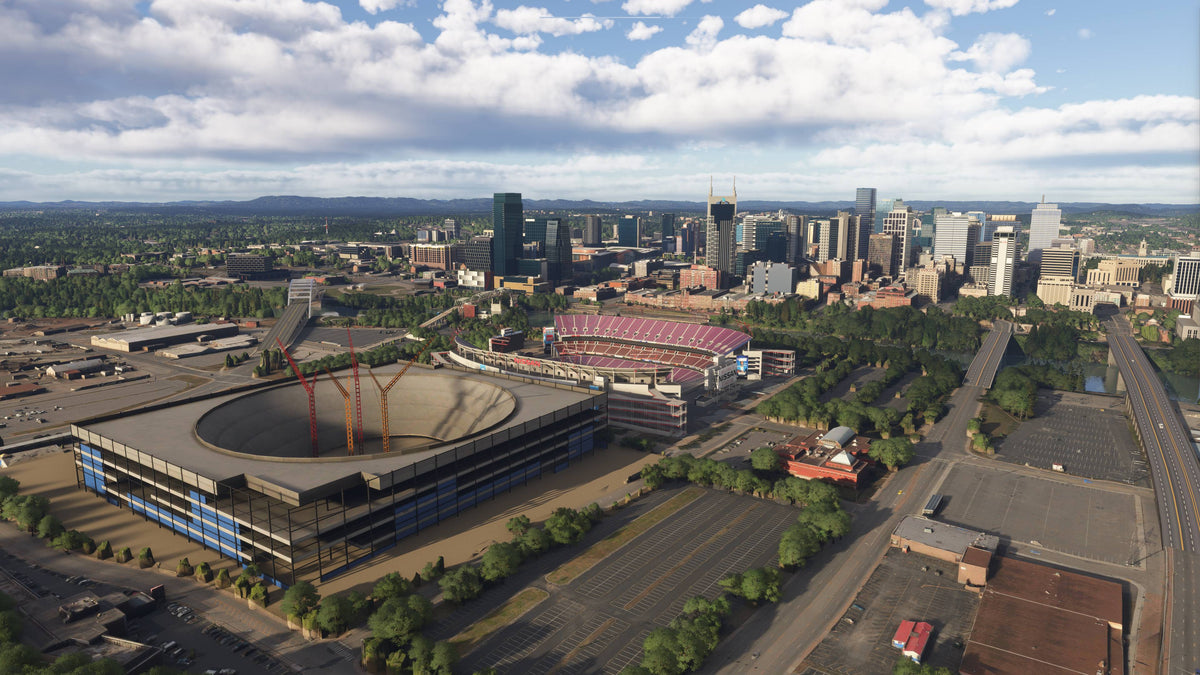
Nissan Stadium and Bridgestone Arena are included alongside the downtown buildings. The pack also depicts the new Nissan Stadium under construction. These are different parts of the scene: the existing stadium and the new construction should not be confused.
The new stadium's completed model is planned as a free update when construction is finished. For the current scenery, expect the construction-stage representation described on the product page. The riverfront amphitheater is another useful stop when exploring the city beyond its tallest buildings.
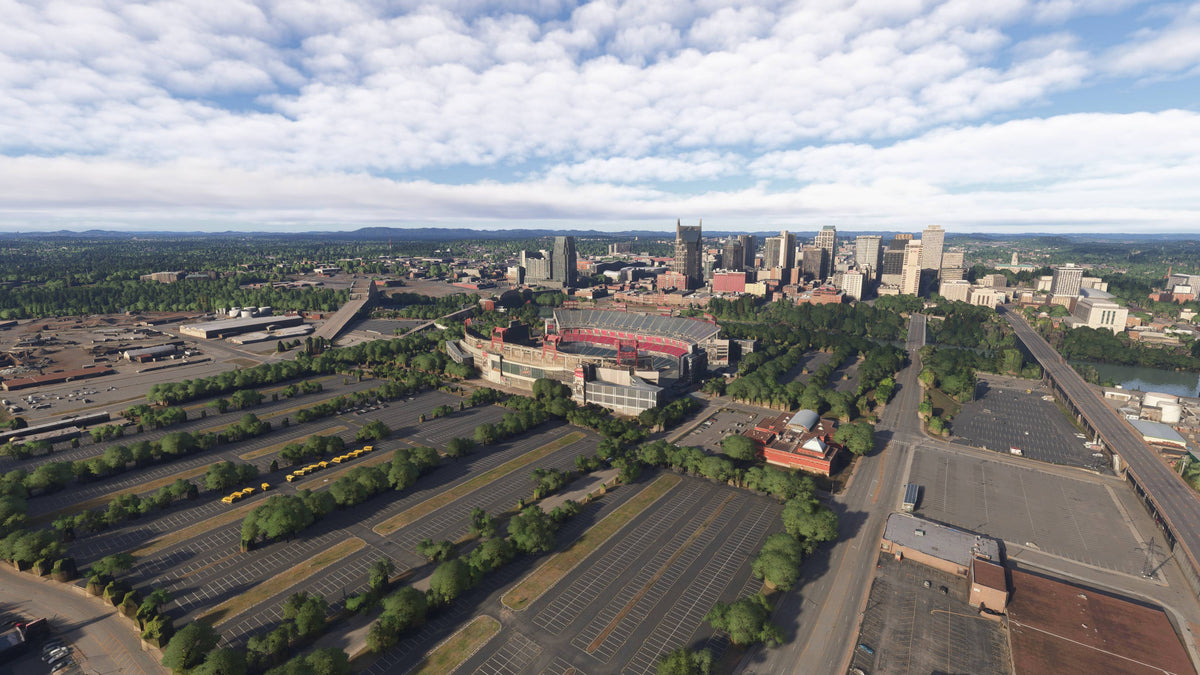
Nashville before and after: the stadium district
This comparison shows the stadium district with downtown beyond it. The add-on view introduces a large stadium construction model in the foreground, with cranes rising above the open structure, while the existing stadium and skyline receive more defined forms. It is a distinctive example of how newer construction changes the scene shown on our product page. These images are the before-and-after comparison from our product listing.
Suggested simulator sightseeing session
- Start above the river in daylight. Use a wide view to place the bridges, skyline and stadium area relative to one another.
- Move in for Broadway. Pause the sightseeing flight and use the camera controls to explore signs and facades at a comfortable pace.
- Try a night riverfront view. Bring the amphitheater and downtown lights into the same frame, then compare it with the daylight skyline.

Watch the Nashville official trailer by AviationLads
Official promotional trailer by AviationLads. Watch on YouTube.
Compatibility and installation
The Nashville pack supports MSFS 2020 and MSFS 2024. For direct-store purchases, the installation guide explains how to download and unzip the files, open PackagesContent, and copy the scenery folder into your simulator's Community folder. Your download is also delivered by email.
If another installed product covers Nashville's buildings or bridges, contact us with its name and your simulator version so we can help with that specific combination.
Nashville scenery FAQ
Does the pack include Broadway's neon signs?
Yes. Detailed Broadway and its neon night lighting are part of the scenery.
Is the new Nissan Stadium already shown as completed?
No. It is represented under construction. A completed version is planned as a free update when construction is finished.
Does it add buildings absent from the default scenery?
Yes. The pack includes more than 40 newer buildings missing from the default MSFS scenery, within a total of 150+ handcrafted downtown buildings.
Where should I ask about installation or another Nashville add-on?
Email dan@dfflyerdirect.com or ask in our Discord. Include your simulator version and the other product's name if your question concerns overlapping scenery.
Community discussions
- Nashville release topic on the MSFS Forums: Community launch post for the Nashville City & Bridges pack.
Browse the full gallery and current details on the Nashville, Tennessee product page.