


The dfflyerdirect Montreal, Quebec scenery pack adds 250+ handcrafted buildings, newer construction, marinas, boats and enhanced night lighting to MSFS 2020 and MSFS 2024. Version 1.2 also adds St. Joseph's Oratory and the Orange Julep, alongside several targeted improvements.
Montreal is a useful city to explore from more than one distance. A view across the water shows the overall skyline, while a closer downtown camera position reveals building shapes, textures and lighting. This guide covers both, plus the version details that matter when choosing your download.
Why the Montreal skyline upgrade stands out
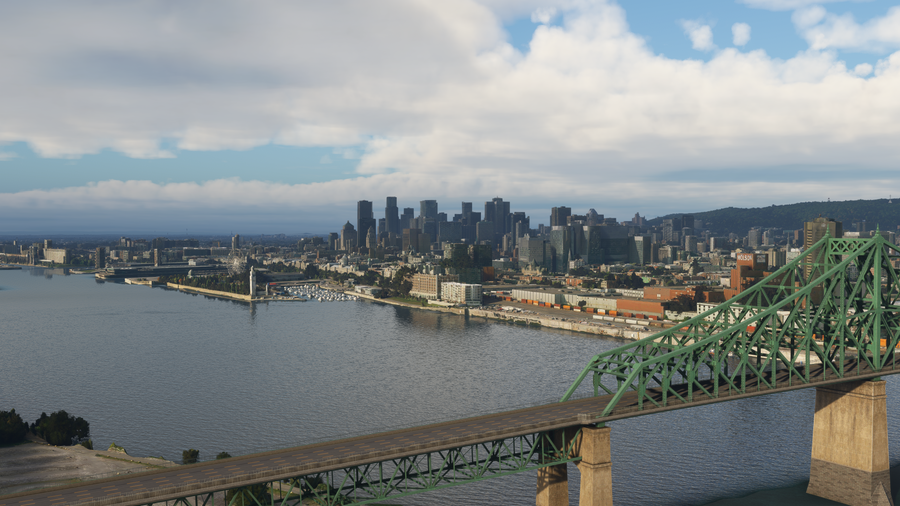
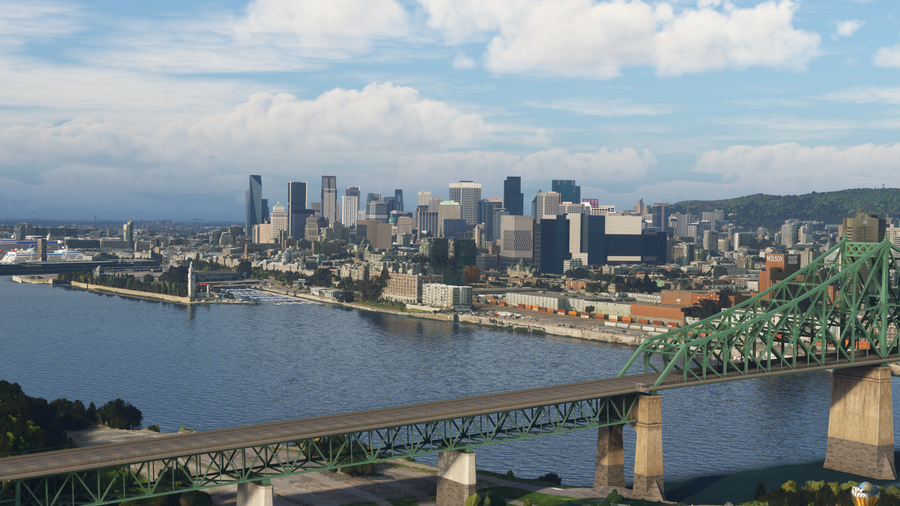
The strength of this pack is the density and variety of its modeled skyline. With more than 250 handcrafted buildings and newer construction included, there is plenty to inspect beyond one landmark. A riverfront view shows the tower profiles together; moving closer reveals facade patterns, materials, and signage. The added Oratory and Orange Julep give a landmark-focused tour more variety, too.
What is included in the Montreal pack?
- 250+ handcrafted city buildings.
- Dozens of newer buildings missing from the default scenery.
- Custom marinas and boats.
- Enhanced night lighting and signage.
- 2K PBR textures and models with multiple levels of detail.
The newer buildings help bring the skyline forward from the older satellite data behind the default scenery. The work also includes smaller waterfront details, giving you subjects beyond the tallest towers when planning a slower sightseeing session.
Montreal before and after
These images come from the comparison on our product page. The riverside viewpoint keeps the downtown skyline behind a green steel bridge. Compare the tower outlines and building facades across the two views, then use the wider product gallery to explore other angles.
What changed in Montreal version 1.2?
The version history records these changes in version 1.2, released July 28, 2026:
- Added St. Joseph's Oratory and the Orange Julep.
- Added backlighting to the Farine Five Roses sign.
- Removed the old Champlain Bridge.
- Fixed a missing texture on a small downtown building.
An earlier update removed oversized cruise ships from the port and corrected some building textures. If you remember those ships from older screenshots or footage, that change is useful context. Check the version history when comparing an older download with the current release.
Suggested Montreal sightseeing session
Begin with a daylight overview from across the water to get the skyline in one frame. Next, use the camera controls for a closer look among the downtown buildings. The gallery's close views let you compare tower heights and facade treatments without needing to cover the whole city in a single pass.
For a landmark-focused variation, make St. Joseph's Oratory and the Orange Julep separate stops in your simulator exploration. Finish after dark with the downtown lighting or the Farine Five Roses sign. These smaller subjects give the session a different focus from a skyline panorama.

Watch the Montreal official trailer by AviationLads
Official promotional trailer by AviationLads. Watch on YouTube.
Compatibility and installation
The Montreal pack supports MSFS 2020 and MSFS 2024. For direct-store downloads, follow the installation guide: unzip the supplied files, open PackagesContent, then move the scenery folder inside it to your Community folder. Download links are also sent to your purchase email.
When checking an update from a particular seller, use that seller's available version alongside our version history. If you have another Montreal add-on, contact us with its name so we can help with the specific combination.
Montreal scenery FAQ
Does the pack include buildings missing from the default city?
Yes. Dozens of newer buildings are included within the total of 250+ handcrafted city buildings.
Are St. Joseph's Oratory and the Orange Julep included?
Yes. Both were added in version 1.2.
Why do older screenshots show large cruise ships?
The oversized cruise ships were removed in version 1.1 following local feedback.
Where can I check updates and get help?
Use our version history, or email dan@dfflyerdirect.com with your simulator version and purchase source.
What simmers say
Selected customer and community reviews:
“Great recreation of the lovely city of Montréal!”
A verified customer praises the recreation of Montréal.
“it now looks amazing”
A verified buyer who says they live in Montreal wrote this after updating to v1.1, which they said fixed the issues they had noticed in v1.
“Thanks for adding stuff and updates!”
A verified buyer welcomes the additions and ongoing updates.
Community discussions
- Montreal screenshots and discussion on the MSFS Forums: User screenshots and release-era impressions.
- Montreal launch and questions on Reddit: Developer-hosted launch thread with community reactions and compatibility questions.
Browse the Montreal, Quebec product page for the full gallery, or join our Discord to ask a question.