


Our Milwaukee scenery combines 120+ handcrafted buildings, 20+ bridges, marinas, boats, and a landable hospital helipad for MSFS 2020 and MSFS 2024. The Milwaukee, Wisconsin city pack makes a varied simulator sightseeing destination, with the lakefront, downtown, waterways, and American Family Field offering different things to explore.
Why Milwaukee offers more than a skyline pass
Milwaukee brings several kinds of scenery together: the lakefront, populated marinas, bridges, downtown towers, a hospital helipad, and American Family Field. The waterfront comparison makes the smaller work easy to appreciate, with boats and docks filling out the foreground below the skyline. That variety gives fixed-wing sightseeing, helicopter exploration, and drone-camera photography their own reasons to visit.
A city tour that goes beyond the skyline
Milwaukee’s lakefront provides a natural opening view. From over the water, the tower group is easy to separate from the lower shoreline, and you can bring marinas into the foreground. Our scenery includes Northwestern Mutual Tower and The Couture, alongside the wider collection of handcrafted buildings.
The bridges and water cleanup make the inland waterways another useful part of the tour. There are more than 20 handcrafted bridges, so leave time to look away from the tallest buildings. A bridge-led view brings structure, shoreline, and downtown into one composition.

Marinas, boats, and the hospital helipad
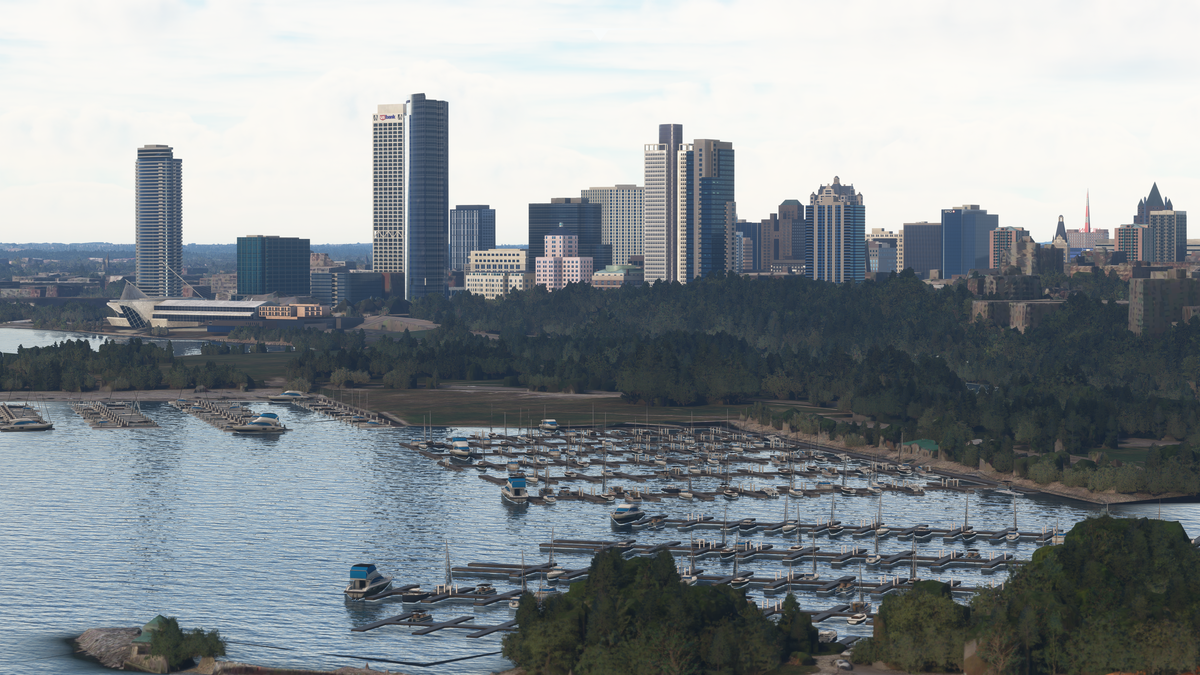
The marina detail gives a lakefront session a smaller-scale subject. Look for the rows of boats and docks and the way they sit inside the breakwater. A broad pass shows the layout; a slower camera move lets you inspect the repeating boat and dock shapes without losing the skyline behind them.
Helicopter users also have a specific destination: the landable helipad on Ascension Columbia St. Mary’s Hospital. Include it as a separate stop if your simulator session is built around rotorcraft flying. The helipad gives the tour an arrival point as well as a collection of views.
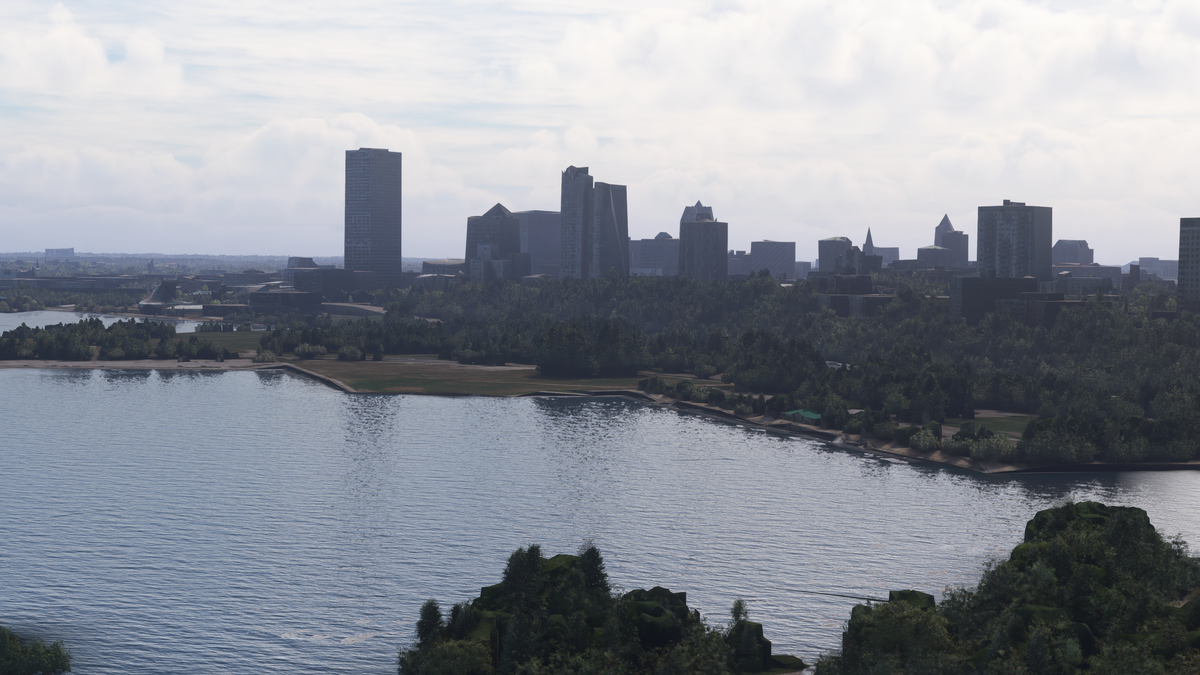
Milwaukee waterfront before and after
In this comparison, the default waterfront has a broad open water foreground. The add-on view fills the marina with individual boats and docks, while the downtown building profiles also change. It is a useful example of why a lakefront tour should include both the skyline and the smaller waterfront details.
American Family Field and its animated roof
Version 1.2 added American Family Field with an animated roof. Its behavior follows the simulated season and weather: the roof closes from October through March and whenever there is precipitation, and opens otherwise. The version history records this addition.
That makes the stadium a useful subject for two separate simulator setups. Choose a dry date outside October through March to view the open-roof state, then use a winter date or precipitation to explore the closed-roof state. This is a feature-specific sightseeing idea, so make sure your installed scenery includes the version 1.2 addition before planning the stop.
A suggested Milwaukee sightseeing sequence
- Open over the lakefront. Frame downtown from a distance with part of the shoreline visible. Use this view to orient yourself before following individual features.
- Give the marinas a slower pass. Include boats and docks in the foreground, then move the camera to show their layout from above.
- Follow the bridges toward downtown. Look at bridge structures and water edges, then return to the building cluster for a closer skyline view.
- Add a stop to suit your aircraft. Helicopter pilots can plan around the hospital helipad. For a stadium-focused session, take the camera to American Family Field and choose a date and weather combination for the roof state you want.
- End with a night lakefront view. Let the dark water separate the illuminated skyline from the foreground. Night lighting and signage are included across the city pack.

Watch the Milwaukee official trailer by AviationLads
Official promotional trailer by AviationLads. Watch on YouTube.
Milwaukee scenery FAQ
Which simulator versions are supported?
The Milwaukee pack supports MSFS 2020 and MSFS 2024. Follow the supplied package instructions and check the version history when updating an older installation.
Does it include bridges and waterfront detail?
Yes. The pack includes 20+ handcrafted bridges, water cleanup, marinas, and boats in addition to 120+ handcrafted buildings. A waterfront-led tour is a good way to cover those features together.
Is there somewhere to land a helicopter?
Yes. Ascension Columbia St. Mary’s Hospital has a landable helipad. Treat it as a dedicated simulator stop within a wider city sightseeing session.
Why is American Family Field’s roof closed?
The animated roof closes during October through March and in precipitation. In dry conditions outside those months, it opens. The stadium was added in version 1.2.
Which newer skyline buildings are included?
Northwestern Mutual Tower and The Couture are both included. Pair a wide lakefront view with a closer downtown pass to explore their place in the building collection.
What simmers say
Selected customer and community reviews:
“Excellent blending and realism.”
“Really nice upgrade for Milwaukee.”
“the City Pack significantly enhances the approach to KMKE’s Runway 19R.”
The early tower-lighting issue mentioned in this discussion was addressed in v1.1, as recorded in our version history.
Community discussions
- Milwaukee screenshots and feedback on the MSFS forums
- Milwaukee before-and-after discussion on Reddit (developer post)
Install the Milwaukee city pack
Buying direct? Download the scenery from the post-checkout download screen or your purchase email, unzip it, and open the extracted folder. Inside PackagesContent, move the scenery folder to your MSFS Community folder. Our installation guide walks through the process. If your download is missing, email support from the address used for your purchase.
See all screenshots and current purchase options on the Milwaukee, Wisconsin product page.
For setup or compatibility help, email dan@dfflyerdirect.com or visit the Dfflyer Direct Discord. Browse more destinations in our scenery guides.