


The Detroit, Michigan & Windsor, Ontario scenery pack adds more than 200 handcrafted buildings, animated landmarks, detailed stadiums, bridges, and marina improvements to both sides of the Detroit River in Microsoft Flight Simulator 2020 and 2024. It is a city-focused enhancement for exploring the skyline, waterfront, and smaller details that make a simulator sightseeing flight feel connected to this particular place.

Why choose the Detroit and Windsor city pack?
The appeal is the combination of a recognizable two-city skyline and details worth exploring close up. Stadium signage, the People Mover, animated landmark lighting, and custom marinas give you different subjects at street, river, and skyline scale. If you enjoy helicopter sightseeing, drone-camera photography, or revisiting a familiar hometown, those smaller touches give you reasons to linger after the first downtown flyover.
What does the Detroit and Windsor pack include?
The main coverage combines 200+ handcrafted city buildings with 15 detailed monuments, including the Spirit of Detroit. Three major sports venues receive individual attention: Comerica Park, Little Caesars Arena, and Ford Field. Their animated lighting is part of a wider set of lighting sequences that also includes the Renaissance Center and historic Penobscot Building.
The scenery extends down to the street and waterfront. More than 25 blocks receive custom street and sidewalk textures to remove baked-in satellite shadows. Sixteen marinas include custom boats alongside photogrammetry and water cleanup. The Gordie Howe International Bridge and MacArthur Bridge to Belle Isle also receive surrounding cleanup, making the river crossings useful landmarks to include in a tour.
- Movement: the People Mover transit system uses three real-world train variants, and American and Canadian flags are animated.
- Materials: PBR textures and multiple levels of detail support the handcrafted scenery.
- Construction updates: named additions include Hudson's Detroit and Hudson's Tower, Huntington Tower, Little Caesars headquarters, and the Residences Water Square.
- Smaller city details: the pack includes the KAWS “Waiting” statue in Campus Martius, the Monroe Street Midway, and the Detroit sign.
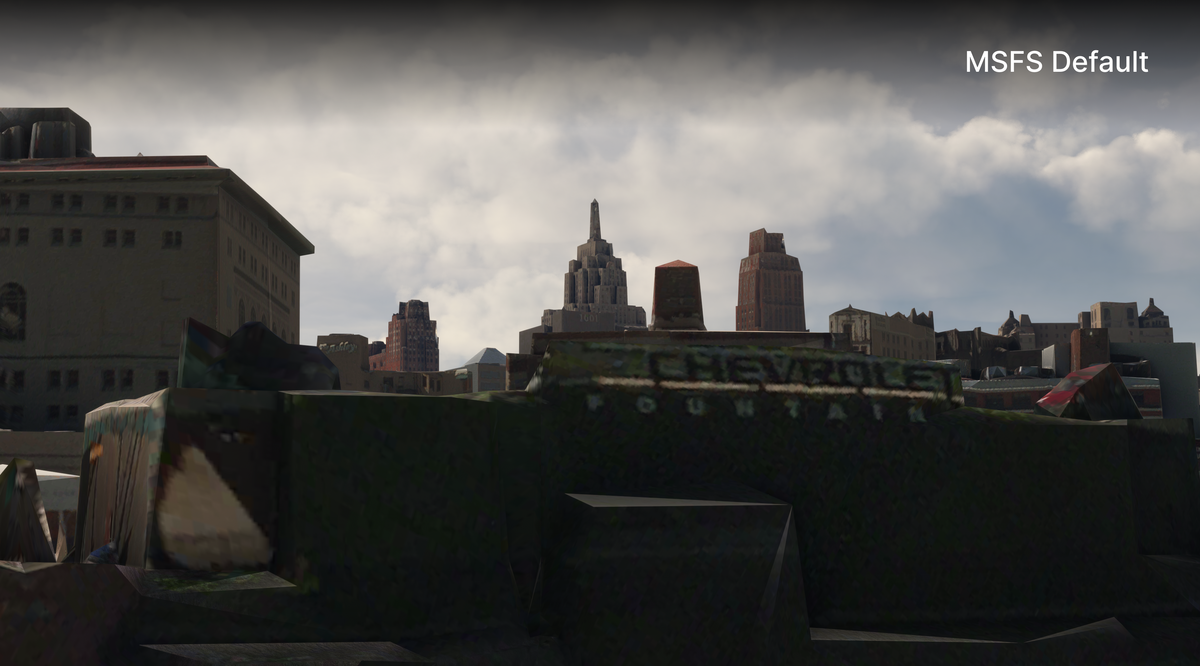
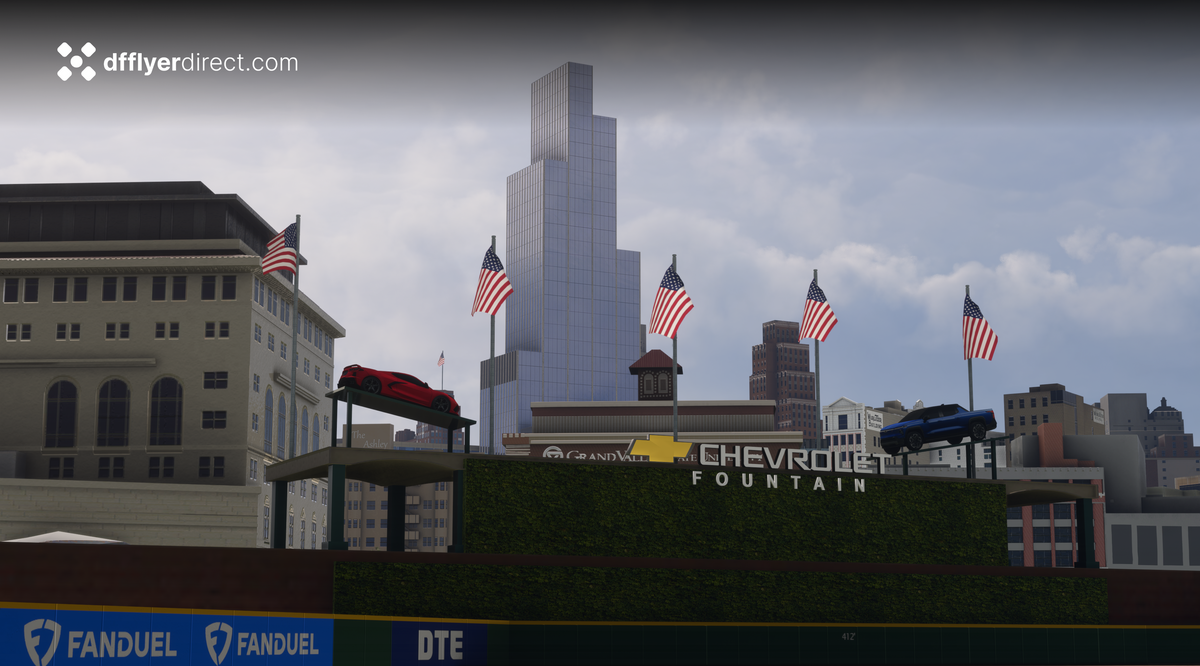
Comerica Park before and after
The outfield comparison shows why this scenery rewards a close look. In the default view, the fountain area and surrounding objects merge into uneven shapes. In our add-on view, the raised cars, individual flags, fountain lettering, and building edges are clearly separated. The skyline also includes a prominent modern tower behind the ballpark. These images are the before-and-after comparison from our product listing.
A suggested simulator sightseeing route
Start with a broad daylight view of the river so that Detroit and Windsor remain visible together. Then follow the waterfront toward the Renaissance Center and turn inland for the stadium district. This gives the large skyline models context before you look more closely at Comerica Park, Ford Field, and Little Caesars Arena.
For a second pass, follow the river toward Belle Isle and MacArthur Bridge, looking for the marina and boat work along the way. Return at dusk or after dark to compare the illuminated stadiums and downtown buildings.

See the official scenery showcase
The showcase linked on the product page provides another way to preview the pack before choosing your own route.
Developer scenery showcase by Dfflyer. Watch on YouTube.
Compatibility and installation
This pack supports MSFS 2020 and MSFS 2024. For a direct store download, unzip the delivered files, open PackagesContent, and place the scenery folder inside your simulator's Community folder. The illustrated installation guide explains the download and folder steps.
Watch the Detroit and Windsor official trailer by AviationLads
Official promotional trailer by AviationLads. Watch on YouTube.
Frequently asked questions
Does the pack cover Windsor as well as Detroit?
Yes. Both cities are part of this product. The waterfront screenshot above shows Windsor's skyline, while the included bridges, boats, and marina work extend the scenery beyond a downtown-only collection of towers.
Is Midtown Detroit included in this purchase?
Midtown Detroit is a separate product focused on the cultural and medical district, Wayne State University, and other Midtown landmarks. Choose coverage by the places you want to explore; the two product pages describe their respective areas.
Does this include Windsor International Airport?
CYQG Windsor International Airport is sold as a separate airport scenery product. Its terminal, hangars, and airfield detailing are described on that listing.
What should I look for after dark?
Try the three stadiums, Renaissance Center, and Penobscot Building. Their animated lighting sequences are specifically listed features, alongside the pack's broader night lighting. The People Mover and flags add movement to closer city views.
What simmers say
Selected customer and community reviews:
“Looks like the screenshots”
David highlighted how the scenery matched its preview images.
“the detail is excellent”
Greg described living in the area and particularly welcomed the inclusion of Little Caesars Arena.
“Absolutely fantastic scenery”
Andrew particularly enjoyed the stadium lighting and recommended exploring low and slow.
Community discussions
- MSFS Forums: Detroit & Windsor owner impressions
- Reddit: local landmarks and scenery-development discussion (developer post)
Explore the scenery
View Detroit, Michigan & Windsor, Ontario and its full screenshot gallery. For installation help, use the installation guide, email dan@dfflyerdirect.com, or join our Discord.