


Our Columbus scenery adds 75+ handcrafted buildings, ScottsMiracle-Gro Field, handcrafted bridges, and water cleanup for MSFS 2020 and MSFS 2024. The Columbus, Ohio city pack lends itself to a compact sightseeing session built around the stadium, riverfront, and downtown skyline, with a second pass after dark for the bridge and building lights.
Why the Columbus stadium and riverfront work together
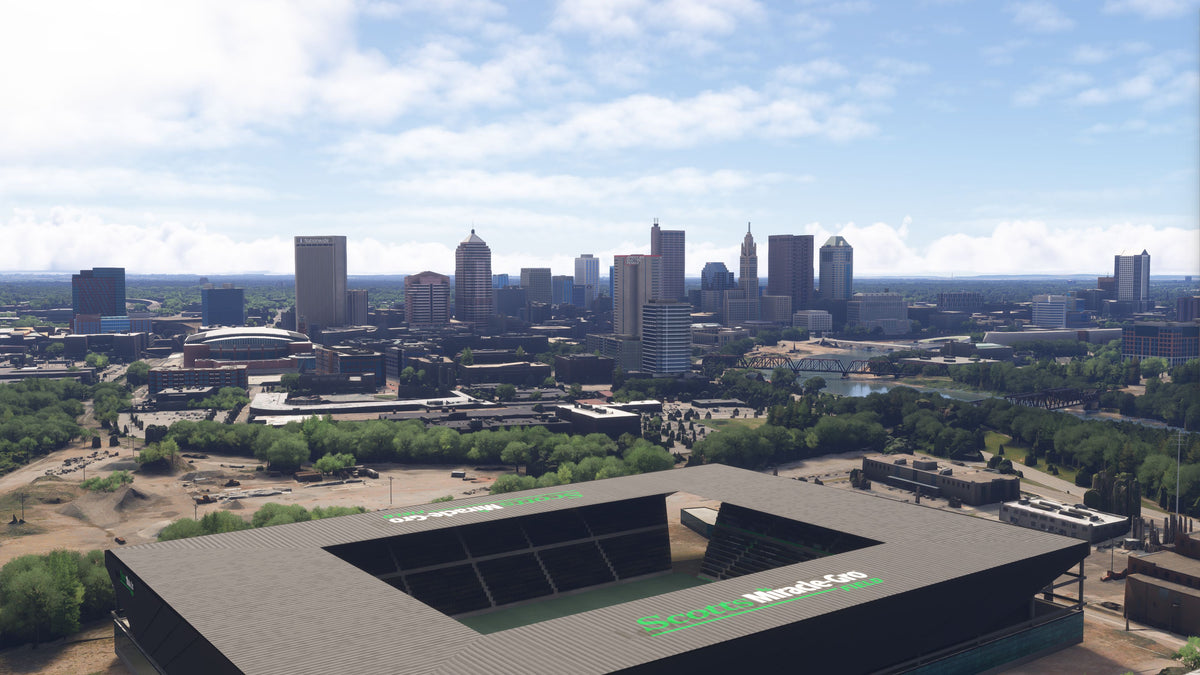
The stadium adds an immediately recognizable foreground to a downtown view, and the riverfront gives you a natural route between the pack’s other subjects. In the comparison, the modeled stadium occupies a site that appears open in the default scene. Its roof shape and signage make a strong visual anchor, while the bridges and night lighting give you reasons to continue along the river.
Start at ScottsMiracle-Gro Field
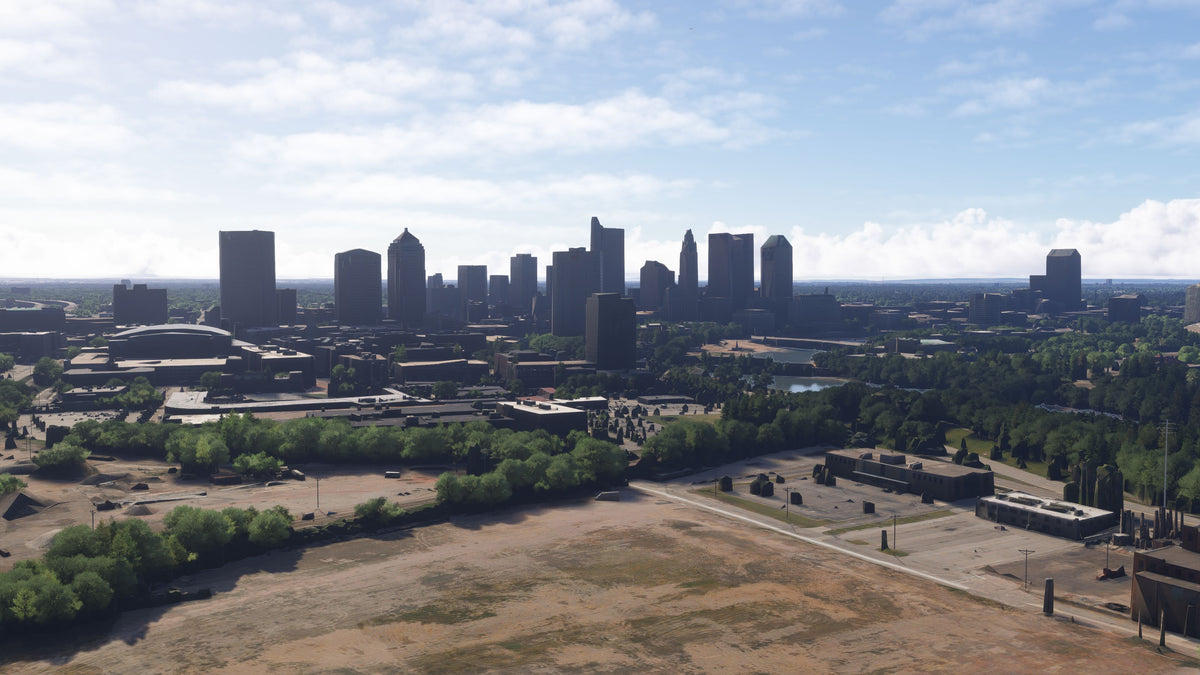
The stadium is a useful first subject because it gives the downtown view a strong foreground. In the screenshot below, its broad roof encloses the pitch while the city buildings rise behind it. The green and white roof signage makes it easy to identify in the composition.
Use two different camera positions to explore it. An elevated view shows the relationship between the roof and the open playing area. A wider view places the stadium within the surrounding city and riverfront. These reveal different parts of the same model without requiring a long sightseeing session.
The stadium view before and after
Our comparison shows open terrain in the default foreground and ScottsMiracle-Gro Field in the add-on view. The roof, signage, and open stadium bowl become a prominent part of the composition, with the updated building models forming the skyline behind it.
Follow the riverfront into downtown
Handcrafted bridges and water cleanup are part of the Columbus pack. The river offers a natural way to move between broad skyline views and smaller structural subjects. Start with a view that includes a crossing and the buildings behind it, then change the angle to examine the bridge itself.
The downtown scenery adds 75+ handcrafted buildings with enhanced textures, signage, PBR materials, and night lighting. From farther away, concentrate on the outline of the building group. Closer in, use the camera to look at the different facades and rooftop shapes. The combination makes the riverfront useful as both a sightseeing corridor and a place to frame screenshots.
The bridge lights make a useful night subject
The night screenshot below shows red and blue illuminated bridge arches reflected in the water, with lit buildings behind them. A low, wide composition puts the arches in the foreground and keeps the skyline visible above. A slightly higher view can include more of the crossing and its connection to the riverbank.
Return to the same area at dusk as well as after dark. At dusk you can still see more of the surrounding banks and building shapes; a darker setup emphasizes the illuminated structures. Keep the camera angle similar if you want a consistent sequence of images.

A suggested Columbus sightseeing session
- Frame the stadium with downtown behind it. Begin in daylight so the roof form, signage, and open pitch are easy to see.
- Widen the view to find the riverfront. Use the stadium as your reference point, then bring nearby crossings and the city layout into the frame.
- Choose a bridge to inspect. Move from a skyline composition to a more focused structural view. Use a camera stop when you want to examine the crossing without rushing.
- Take a closer look at downtown. Pick a few buildings with different heights and rooflines. A broad city circle and a pair of deliberate camera views provide different perspectives on the same collection.
- Return after dark. Revisit the illuminated arches and the stadium, then finish with a wider skyline view showing the city lighting.
For a short session, the stadium and one bridge viewpoint are enough to give you two different subjects. Add the closer downtown views when you have more time.
Columbus scenery FAQ
Does the pack include ScottsMiracle-Gro Field?
Yes. The stadium is included and makes a useful starting landmark for a sightseeing session. The gallery shows it in daylight and at night.
Which Microsoft Flight Simulator versions are supported?
Columbus supports both MSFS 2020 and MSFS 2024. Follow the installation instructions supplied with the package when adding it to your simulator.
Are the bridges included as well as the buildings?
Yes. Handcrafted bridges and water cleanup accompany the 75+ handcrafted buildings. Include the riverfront when exploring the pack so you see both parts of the scenery.
What is a useful view for night screenshots?
The illuminated bridge arches make a strong foreground, especially with downtown visible behind them. Try a wider frame first, then tighten it around the colored arches and water reflections.
How much time do I need for a first look?
Choose the amount of sightseeing that fits your session. Start with the stadium and one riverfront view, then add a downtown pass or a night revisit. The itinerary is flexible rather than a timed flight plan.
What simmers say
Selected customer and community reviews:
“the buildings with light souroundings looks phenomenal”
This comment praises the illuminated buildings; it also mentions rough roads and debris in the underlying MSFS 2024 scenery.
“Very impressed”
Community discussions
Install and explore Columbus
Buying direct? Download the scenery from the post-checkout download screen or your purchase email, unzip it, and open the extracted folder. Inside PackagesContent, move the scenery folder to your MSFS Community folder. Our installation guide walks through the process. If your download is missing, email support from the address used for your purchase.
Find the complete gallery and current purchase options on the Columbus, Ohio product page. For another Ohio riverfront destination, take a look at our Cincinnati city pack.
For setup or compatibility help, email dan@dfflyerdirect.com or visit the Dfflyer Direct Discord. Browse more destinations in our scenery guides.