


The dfflyerdirect Baltimore, Maryland scenery pack adds 75+ handcrafted city buildings, detailed sports venues and waterfront cleanup to Microsoft Flight Simulator 2020 and MSFS 2024. Its main subjects are Baltimore's skyline, Camden Yards, M&T Bank Stadium and the city around the harbor.
If you are choosing scenery for a Baltimore sightseeing flight, this guide explains what the pack includes, which details to look for and how to plan a useful first look in the simulator.
Why choose Baltimore for a detailed city tour?
The stadiums and harbor give Baltimore an especially readable sightseeing layout. You can start with the downtown skyline, move closer to the sports venues, then follow the waterfront for a different perspective. The modeled seating, building shapes, signage, and night lighting add detail at each of those scales, making a second pass after dark worthwhile.
What does the Baltimore scenery pack include?
- 75+ handcrafted city buildings.
- Detailed Camden Yards and M&T Bank Stadium with 4K textures.
- Water, marina and tree cleanup.
- Enhanced night lighting and signage.
- PBR textures.
The stadiums provide two distinct focal points. M&T Bank Stadium has the open football bowl and purple seating visible in our gallery. Camden Yards brings a different shape to the scene, with its baseball field, surrounding stands and long brick warehouse. Looking at both helps put the nearby skyline into context.

Camden Yards, the skyline and the waterfront
Start with a broad view before moving the camera closer. The city buildings establish the skyline, while the sports venues give you recognizable shapes to pick out beneath it. Our Camden Yards screenshot shows the ballpark's seating bowl, field, light structures and brick warehouse together, making it a useful reference for what to look for in the simulator.
The cleanup work addresses water, marinas and trees as part of the surrounding city scenery. That wider setting matters when your view includes the shoreline rather than only the tops of the buildings. The product's night lighting and signage offer a second way to explore the same area after dark.

Baltimore before and after at night
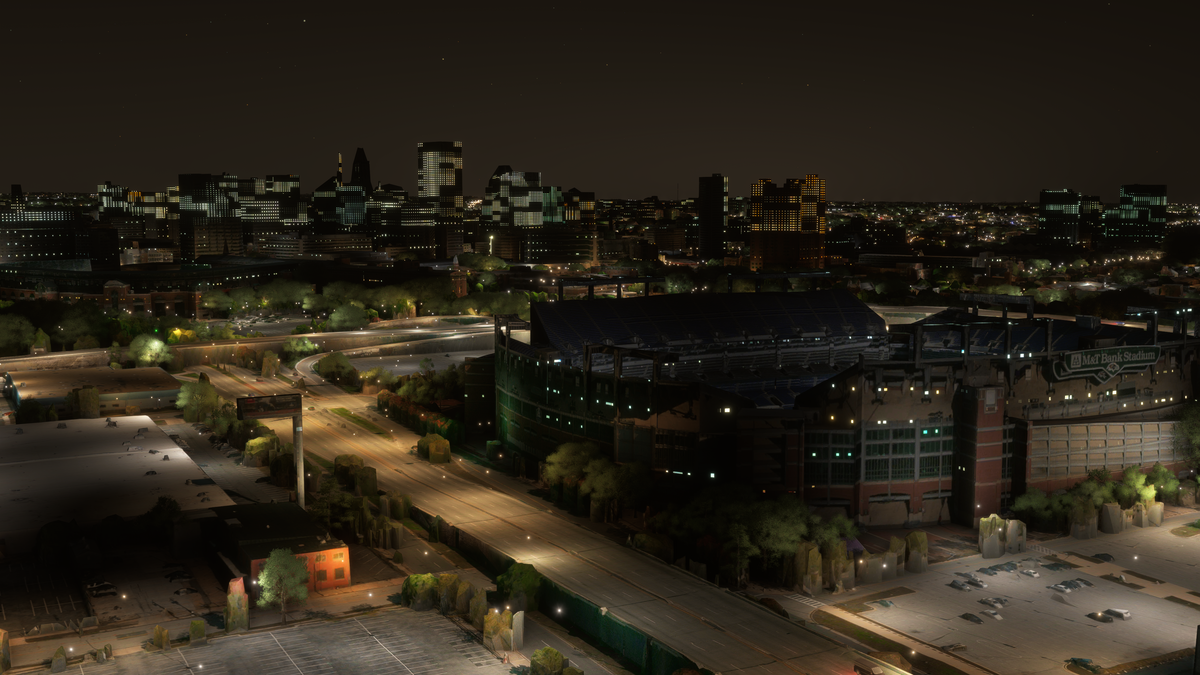
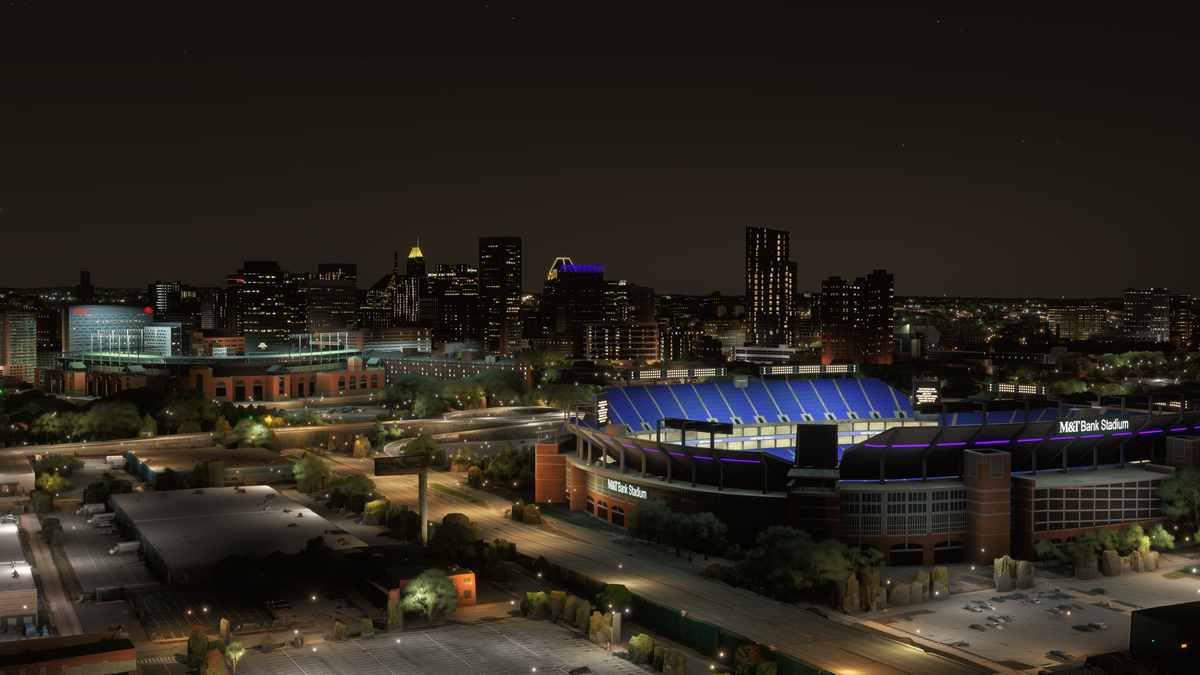
The paired night view puts M&T Bank Stadium in the foreground. Our version separates the seating rows and structural elements, adds readable stadium signage and purple accents, and gives the skyline more distinct roof and facade lighting. It is a useful preview of what to look for when you return to Baltimore after dark. These images are the before-and-after comparison from our product listing.
A suggested Baltimore sightseeing session
For a first simulator visit, try these three viewing ideas. Use them to explore the pack at your own pace.
- Begin with a daytime skyline view. Choose clear conditions and a viewpoint that keeps the city and stadium district in the same frame. This makes the relationship between the tall buildings and lower sports venues easy to follow.
- Inspect the ballpark and football stadium separately. Use the simulator's camera controls for a closer look at the seating, structures and textures without rushing past them.
- Return to the harbor after dark. Compare the lit windows, rooftop accents and waterfront scene with your daytime view. Keeping a similar viewpoint makes the lighting changes easier to see.

Watch the Baltimore official trailer by AviationLads
Official promotional trailer by AviationLads. Watch on YouTube.
Compatibility and direct-store installation
Baltimore supports both MSFS 2020 and MSFS 2024. If you already use another add-on covering the same part of the city, check that specific combination with us before installing both.
For a direct-store download, follow the installation guide: download and unzip the supplied files, open the PackagesContent folder, then place the scenery folder inside it into your simulator's Community folder. Download links are also sent by email. The guide includes help locating the Community folder.
Baltimore scenery FAQ
Are both major stadiums included?
Yes. Camden Yards and M&T Bank Stadium are specifically included, with 4K textures listed for the stadium models.
Is this a Baltimore airport scenery package?
This is city scenery focused on buildings, stadiums, lighting and environmental cleanup. It does not include an airport overhaul.
Does the pack change the city at night?
Yes. Enhanced night lighting and signage are included, and the gallery shows the skyline and waterfront after dark.
Where can I get help with a download or overlapping scenery?
Email dan@dfflyerdirect.com with your simulator version and the add-ons involved. For a missing purchase download, contact us from the email address used at checkout.
What simmers say
Selected customer and community reviews:
“Camden Yard Wow!”
The reviewer singles out Camden Yards.
“I love the night lighting”
The reviewer praises the skyline’s atmosphere and wishes BWI were geographically closer to downtown to enjoy more of the view.
“Great work”
Reviewing Baltimore, this buyer also praises the developer’s focus on secondary cities.
Community discussions
- Baltimore release topic on the MSFS Forums: Launch discussion about Baltimore and nearby airport pairings.
See the full gallery and current details on the Baltimore, Maryland product page, or join our Discord with questions.